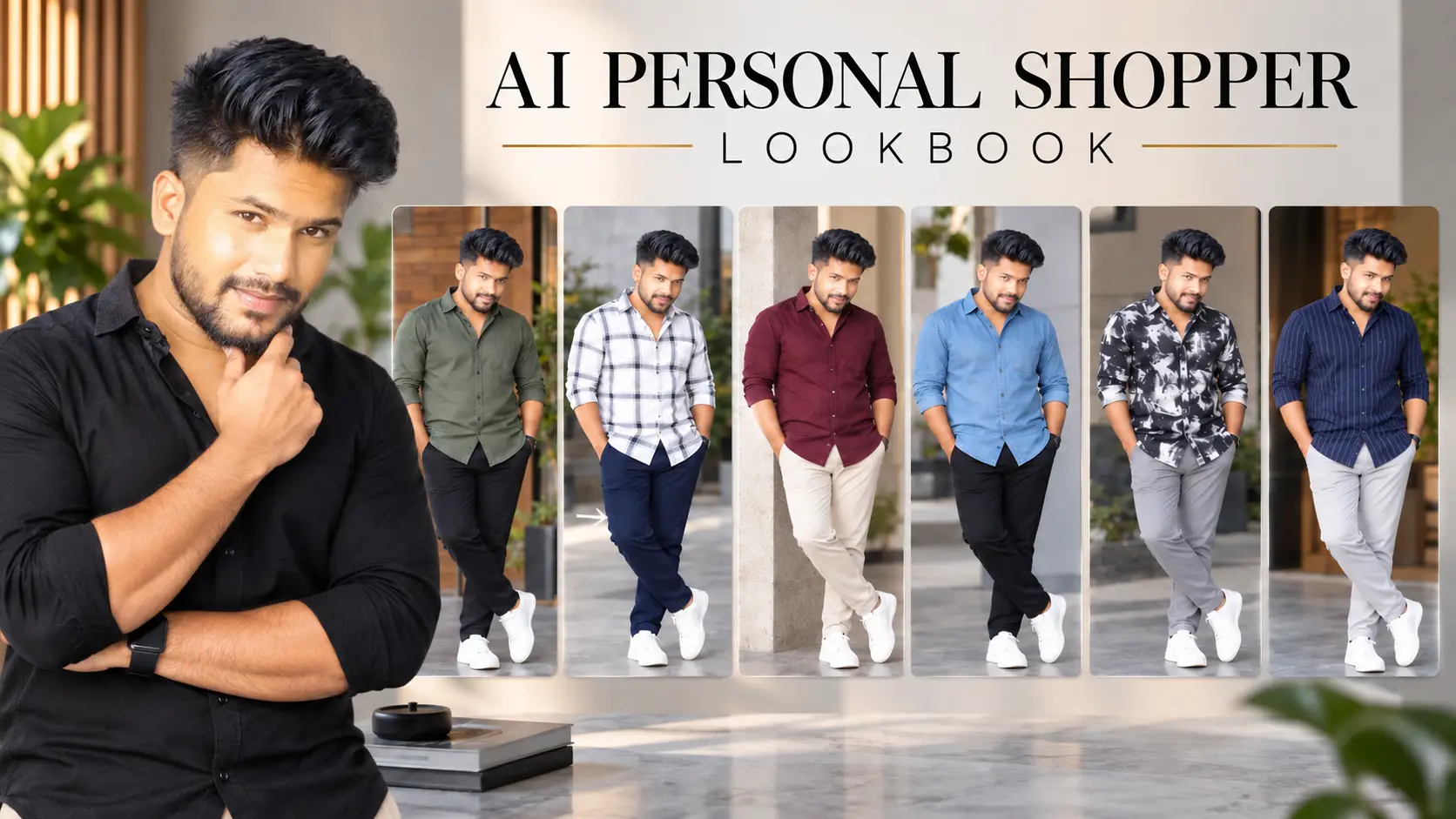
Have you ever looked at a shirt or pair of pants online and wondered, “Will this actually suit me?” Choosing clothes is not always easy because an outfit that looks great on one person may look completely different on someone else.
That is where an AI Personal Shopper Lookbook can be useful.
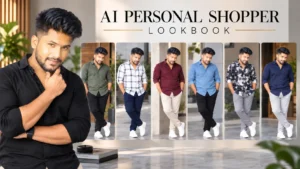
Instead of asking AI to create random fashion models wearing different clothes, you can give it your own photo and use a carefully designed prompt to create a personalized fashion lookbook. The idea is to let AI analyze your visible appearance first and then generate outfit combinations specifically around you.
In this guide, you will find a ready-to-use AI Personal Shopper Lookbook prompt that you can copy and paste directly into ChatGPT. You only need to upload your photo along with the prompt and let the AI create the lookbook.
What Is an AI Personal Shopper Lookbook?
An AI Personal Shopper Lookbook is a collection of personalized outfit ideas generated using your own photograph as the reference.
The main difference between a normal AI fashion prompt and a personal shopper prompt is personalization.
Instead of simply saying “create stylish men’s outfits,” the prompt asks AI to first analyze the person’s visible characteristics, including face shape, facial proportions, skin tone, hair, beard, body proportions and overall appearance.
The AI then uses that information to select shirt and pants combinations that are intended to suit that particular person.
The result is designed to look like a personal digital fashion consultation rather than a collection of generic clothing images.
AI-powered tools are making it easier to explore creative ideas, generate content and experiment with new digital experiences. If you are interested in discovering more useful AI tools, you can also explore our guide to Top Free AI Tools.
If you want to create personalized images using your own photo and detailed instructions, ChatGPT Images provides a convenient way to generate and edit images directly through ChatGPT.
What Will the AI Personal Shopper Lookbook Create?
The prompt is designed to generate 18 different full-body outfits.
These outfits are divided into three categories, with six outfits in each category.
PREMIUM EVERYDAY
The first row contains six comfortable and stylish everyday outfits.
These looks are intended for normal daily activities such as going out, shopping, meeting friends, travelling or casual occasions.
SMART EVERYDAY
The second row contains six more polished combinations.
These outfits are suitable for work, outings, meetings and social occasions where you want to look neat and well-dressed without going over the top.
SIGNATURE PREMIUM
The final row contains six premium combinations specifically selected for the person in the uploaded photograph.
These are intended to be some of the strongest outfit combinations based on the person’s appearance.
AI image generation has become a useful way to turn detailed ideas into visual concepts. You can learn more about different options in our guide to Best Free AI Image Generators.
Why Does the Prompt Analyze Your Photo First?
The analysis step is one of the most important parts of this AI Personal Shopper Lookbook.
If you simply ask an AI image generator to create fashionable outfits, it may produce clothing that looks good in general but does not necessarily complement your appearance.
This prompt takes a different approach.
It specifically tells the AI to analyze the person’s face shape and facial proportions, skin tone, hair and beard, visible body proportions and overall appearance before selecting the outfits.
That means the intended workflow is:
Upload your photo → Analyze your appearance → Select suitable outfits → Generate the personalized lookbook.
The goal is to make the generated clothing choices feel more personal rather than generic.
Understanding how AI-generated visuals are created can also help you recognize when an image has been produced or modified using artificial intelligence. For more information, see our guide on How to Detect AI-Generated Content.
The Same Person Should Appear in All 18 Looks
Another important part of the prompt is identity consistency.
When AI generates multiple images, facial features can sometimes change from one image to another. For this reason, the prompt specifically instructs the AI to keep the same person and exact facial identity throughout the entire lookbook.
The face should remain clear and recognizable.
The prompt also tells the AI not to reshape, beautify, slim or otherwise change the face.
This is important because the purpose of the AI Personal Shopper Lookbook is to show how different outfits could look on the same person.
AI image generation can sometimes produce noticeable changes between images, so understanding how AI-generated content works is useful when reviewing a personalized lookbook. You can read more in How to Detect AI-Generated Content.
Full-Body Outfits Instead of Portraits
The prompt also requires every outfit to be shown as a large full-body standing look.
The person should be visible from head to shoes.
This allows you to see the complete combination rather than just the shirt.
Natural professional standing poses are requested so the images look more like a clean fashion lookbook rather than dramatic modelling photographs.
A detailed image-generation prompt can help control the composition and visual elements of an AI-created image. For more tools that can help with visual creation, check out Best Free AI Image Generators.
What Does “Premium” Mean Here?
The word “premium” does not mean luxury fashion, celebrity clothing or unrealistic runway outfits.
In this prompt, premium means stylish, clean, well-fitted and realistically wearable.
The idea is to create outfits that normal people could actually wear.
The prompt therefore avoids unnecessary fashion elements such as jewellery, watches and sunglasses.
This keeps the focus on the shirt, pants, fit and overall appearance.
The idea of premium AI fashion is not about expensive or unrealistic styling. It is about creating clean, practical and visually appealing results with the right AI tools and detailed instructions. If you enjoy experimenting with creative AI visuals, you can also explore our guide to 80s AI Photo Trend Prompts.
How to Use the AI Personal Shopper Lookbook Prompt
Using the prompt is simple.
First, choose a clear photo of yourself. A photo where your face is clearly visible is recommended because the AI needs a good reference for maintaining your identity.
Next, open ChatGPT and upload your photograph.
Then copy the complete prompt below and paste it into the chat.
You do not need to rewrite the prompt. It is already structured to tell the AI what to analyze, how many outfits to create and how the final lookbook should be arranged.
For the best result, use the complete prompt rather than copying only part of it.
Copy and Paste the Prompt
The following is the complete AI Personal Shopper Lookbook prompt. Copy it directly and use it with your uploaded photo.
Create a PREMIUM AI PERSONAL SHOPPER LOOKBOOK using my uploaded photo.
FIRST analyze and verify the person’s actual:
• Face shape & facial proportions
• Skin tone
• Hair & beard
• Visible body proportions
• Overall appearance
THEN choose ONLY the shirt + pants combinations that genuinely suit THIS PERSON.
Do NOT create generic outfits.
Create EXACTLY 3 FULL ROWS, with 6 LARGE FULL-BODY STANDING OUTFITS in each row.
ROW 1 — PREMIUM EVERYDAY
6 stylish, comfortable, realistic everyday shirt + pants looks.
ROW 2 — SMART EVERYDAY
6 polished shirt + pants looks for work, outings and social occasions.
ROW 3 — SIGNATURE PREMIUM
6 of the BEST shirt + pants combinations specifically selected for THIS PERSON.
IMPORTANT:
Every outfit must have a properly matched shirt and pants.
Different outfit in every image.
Full body visible from head to shoes.
Face must be clear and recognizable.
Use natural professional standing fashion poses.
Add a small PREMIUM “FACE VERIFIED ✓” visual badge in one corner near the top, using the uploaded photo as the verification reference.
The badge should communicate:
“FACE VERIFIED”
“OUTFITS PERSONALLY SELECTED”
Do NOT add long text or explanations.
“PREMIUM” means stylish, clean, well-fitted and realistically wearable by normal people — NOT billionaire, celebrity or runway fashion.
Keep the SAME person and exact facial identity in all 18 images.
Do not reshape, beautify, slim or change the face.
NO accessories.
NO jewellery.
NO watches.
NO sunglasses.
NO color charts.
NO avoid outfits.
NO long text.
Only headings:
PREMIUM EVERYDAY
SMART EVERYDAY
SIGNATURE PREMIUM
Make the outfit images LARGE and occupy most of the canvas.
MOST IMPORTANT:
ANALYZE & VERIFY THE PERSON FIRST → IDENTIFY WHAT SUITS THEIR FACE & PROPORTIONS → SELECT SHIRT + PANTS → CREATE THE LOOKBOOK.
Every outfit must look personally selected for THIS PERSON.
What You Can Expect From the Result
Once you upload your photo and use the prompt, the AI is instructed to create three rows containing six looks each.
The first six looks focus on everyday clothing, the next six focus on smart everyday styling, and the final six focus on signature premium combinations.
The prompt also asks for different outfits throughout the lookbook so that the final result does not simply repeat the same shirt and pants combinations.
The FACE VERIFIED ✓ badge adds another visual element to the design. It communicates that the uploaded photograph was used as the reference for the person’s identity and that the outfits were personally selected around that person.
AI image generation can produce different results depending on the reference image and instructions you provide. For another AI-powered image creation option, you can also explore Gemini image generation and editing.
A Simple Way to Experiment With Your Style
One of the biggest advantages of an AI Personal Shopper Lookbook is that you can experiment before making a clothing decision.
You can see multiple combinations in one visual layout instead of imagining how different colours, fits and shirt-and-pants combinations might look together.
You can also use the generated looks as inspiration when shopping for clothes in stores or online.
Of course, an AI-generated image is a visual styling concept rather than a guarantee that a particular garment will fit exactly the same way in real life. Actual fit can vary depending on the brand, fabric, measurements and clothing cut.
If you want to experiment with AI-generated visuals beyond this fashion lookbook, Adobe Firefly provides tools for generating images from text prompts and exploring different creative ideas.
Final Thoughts
An AI Personal Shopper Lookbook offers a simple way to turn your own photograph into a personalized fashion inspiration board.
The key idea is that the AI does not start with generic outfits. It is instructed to analyze the person first, identify what may suit their visible appearance and proportions, and then create different shirt and pants combinations around that person.
With 18 looks divided into PREMIUM EVERYDAY, SMART EVERYDAY and SIGNATURE PREMIUM, the prompt provides a structured way to explore different styles while keeping the same person’s identity throughout the lookbook.
If you want to try it yourself, simply upload your photo to ChatGPT, copy the complete prompt above, paste it into the chat and generate your personalized lookbook.