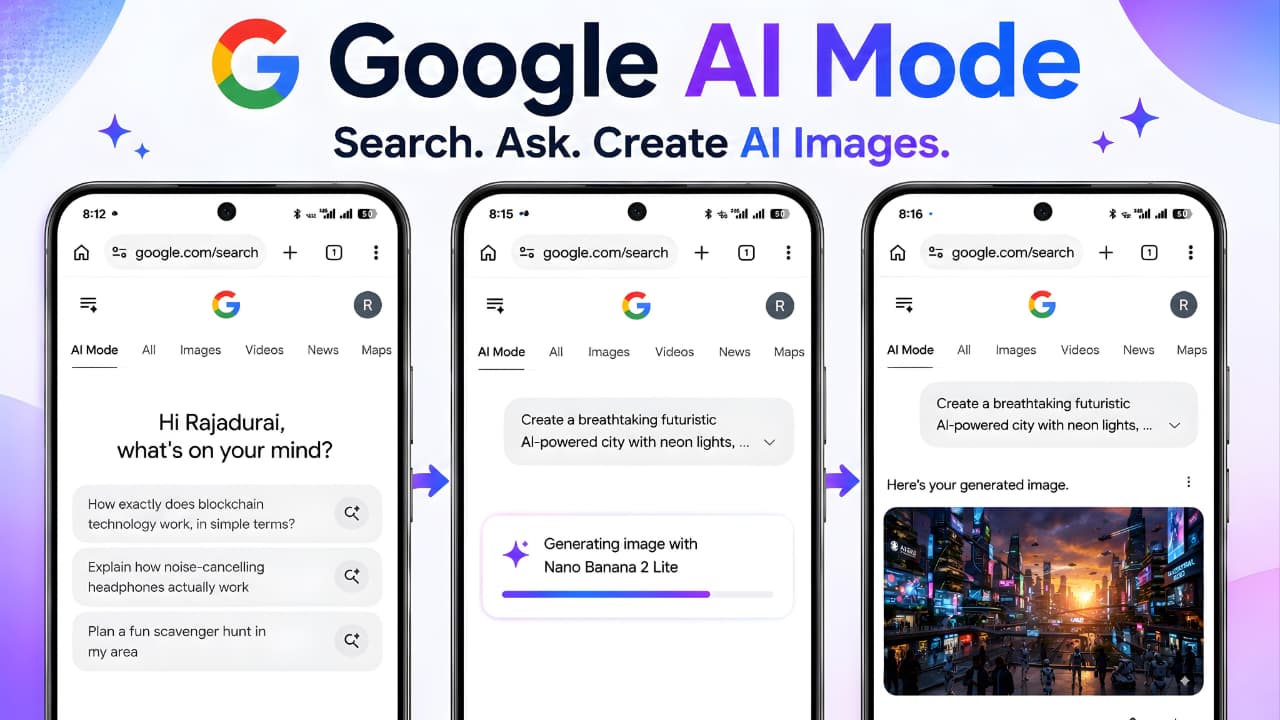
Google Search is evolving beyond a traditional search engine. With the rapid advancement of artificial intelligence, Google has introduced Google AI Mode, a powerful way to search, explore, and interact with information using conversational AI. Instead of receiving only a list of web links, users can ask detailed questions, receive intelligent answers, compare products, plan trips, solve problems, and now even generate AI images directly within Google Search.
The latest Google AI Mode Image Generation update expands Google’s AI capabilities by allowing users to create original AI-generated images without leaving the search experience. Rather than opening a separate AI image generator, users simply describe what they want, and Google creates an image using its latest AI technology.
This update makes creative tasks much easier for students, bloggers, marketers, designers, educators, social media creators, and anyone who wants quick, high-quality visuals. Whether you need a realistic landscape, an artistic illustration, or a custom social media graphic, Google AI Mode now brings image creation directly into your search workflow.
In this complete guide, you’ll learn everything about Google AI Mode Image Generation, including how it works, its newest features, supported regions, advantages, limitations, practical use cases, and the best tips for creating better AI-generated images.
What Is Google AI Mode Image Generation?
Google AI Mode Image Generation is a new feature inside Google Search’s AI Mode that allows users to create AI-generated images using simple natural language prompts. Instead of searching for existing images on the web, users can generate completely new visuals by describing exactly what they want.
For example, you can type prompts such as:
- Create a futuristic smart city at sunset.
- Generate a realistic white tiger walking through snow.
- Design a modern workspace with AI robots.
- Create a cinematic fantasy castle above the clouds.
Google’s AI understands the prompt and produces an original image based on your description. This eliminates the need to switch between multiple AI tools for basic image generation tasks.
Unlike traditional image search, which only finds images already published online, Google AI Mode Image Generation creates entirely new visuals based on your imagination. This represents a significant step toward making Google Search a complete AI-powered productivity platform rather than simply a search engine.
The feature is designed to be intuitive, allowing beginners to create impressive visuals without any design experience. Users only need to describe their idea clearly, and Google’s AI handles the creative process automatically.
Google AI Mode Image Generation is a new feature inside Google Search’s AI Mode that allows users to create AI-generated images using simple natural language prompts. Google officially explains how Google AI Mode works and how users can access its latest AI-powered Search experience.
What's New in the Latest Google AI Mode Update?
Google’s latest update introduces one of the biggest improvements to AI Mode since its launch: native AI image generation directly within Google Search.
Previously, AI Mode focused on answering complex questions, summarizing information, comparing products, and helping users perform research. With this new enhancement, AI Mode now supports visual content creation as part of the same experience.
Some of the major highlights include:
- AI-generated images can now be created directly inside Google AI Mode.
- Users no longer need to open a separate image-generation service for many common creative tasks.
- Natural language prompts are supported, making image creation simple even for first-time users.
- The feature is designed to work alongside Google’s conversational AI, allowing users to refine prompts and request improved versions of generated images.
- Google continues rolling out this capability gradually, so availability may vary depending on the user’s region, language, and account eligibility.
This update reflects Google’s broader goal of making AI assistance more useful for everyday activities, combining information search, reasoning, and creative generation within a single interface.
Google continues rolling out this capability gradually, so availability may vary depending on the user’s region, language, and account eligibility. Users can follow the official Google Search updates to learn about newly released AI features and rollout announcements.
Google continues rolling out this capability gradually, so availability may vary depending on the user’s region, language, and account eligibility. To stay informed about latest Google updates, users should regularly check Google’s newest AI announcements and feature releases.
How Does Google AI Mode Image Generation Work?
One of the biggest advantages of Google AI Mode Image Generation is its simplicity. Unlike many AI design platforms that require multiple settings or technical knowledge, Google focuses on a prompt-based experience. Users simply describe the image they want, and the AI generates it within Google Search.
When a user enters a detailed prompt, Google AI analyzes the request, understands the subject, background, lighting, colors, artistic style, and overall context. It then creates a brand-new image based on that description instead of searching for existing pictures online.
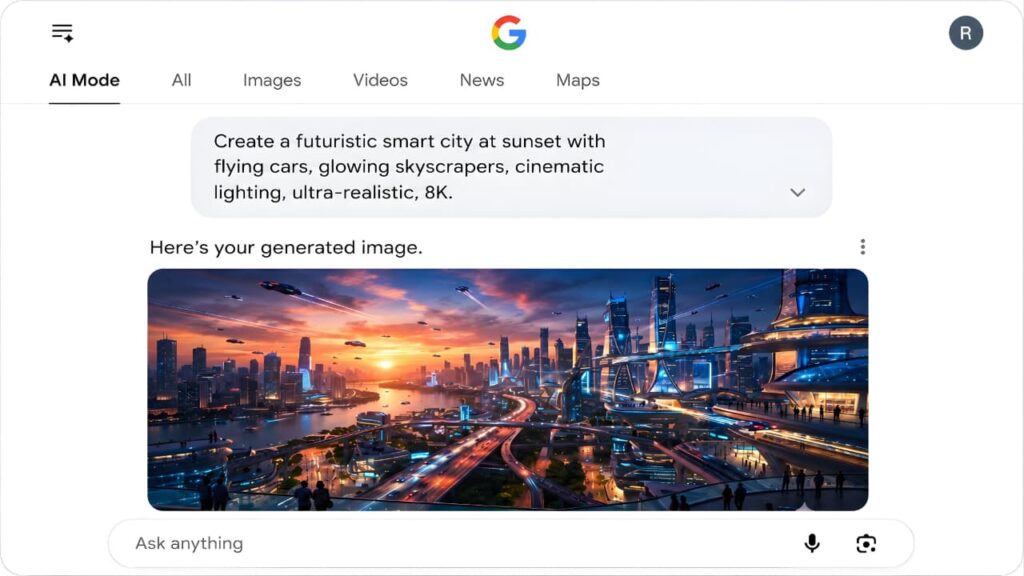
The system is also designed to support follow-up conversations. If the first result is not exactly what you expected, you can refine your prompt by asking for changes such as different colors, camera angles, backgrounds, or artistic styles. This conversational workflow makes Google AI Mode Image Generation much more interactive than a traditional image search.
Google continuously improves the experience using its latest AI technologies, helping users generate higher-quality visuals while maintaining safety measures for AI-generated content.
Google continuously improves the experience using its latest AI technologies, helping users generate higher-quality visuals while maintaining safety measures for AI-generated content. These capabilities are powered by multimodal AI, which allows Google’s models to understand both text and images together.
How to Create AI Images in Google AI Mode
Creating AI-generated images inside Google Search is straightforward. Follow these steps to get started.
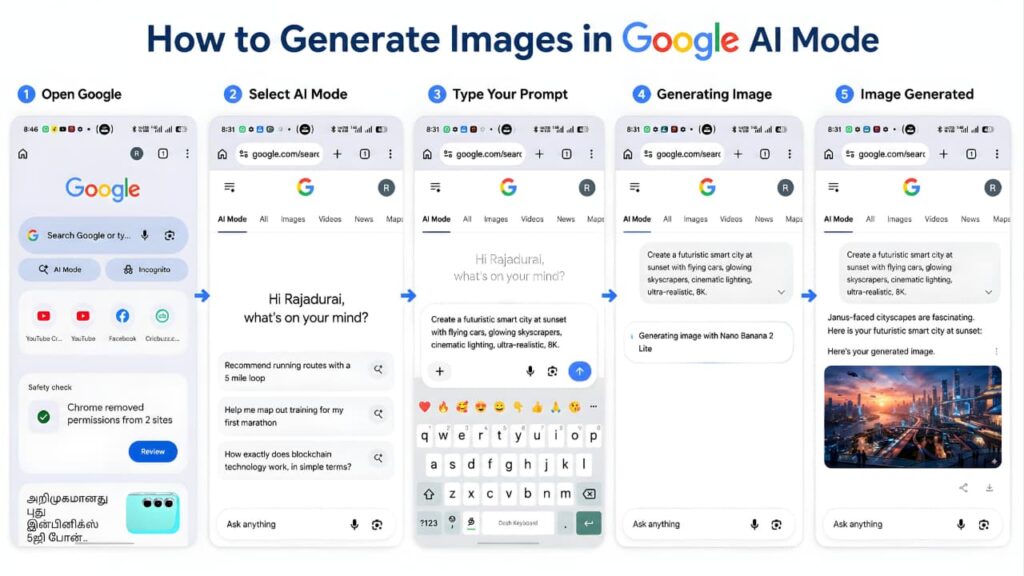
Step 1: Open Google Search
Visit Google Search and switch to AI Mode if it is available for your account.
Step 2: Enter Your Prompt
Describe the image as clearly as possible. Instead of writing a short sentence like “Create a dog,” provide more details.
For example:
“Create a realistic golden retriever running on a green meadow during sunrise with cinematic lighting.”
A detailed prompt usually produces better results.
Step 3: Wait for Image Generation
Google AI processes your request and generates an original image based on your description. The time required may vary depending on the complexity of the prompt and system availability.
Step 4: Refine the Result
If the generated image is close to your idea but needs improvements, continue the conversation naturally.
For example:
- Make the background darker.
- Add mountains behind the lake.
- Change the weather to snowfall.
- Create a cartoon version.
- Add dramatic lighting.
This conversational editing process allows users to improve the image without starting over.
Step 5: Save or Use the Image
Once satisfied with the generated result, you can use it according to Google’s applicable terms and any usage restrictions that apply to AI-generated content.
Key Features of Google AI Mode Image Generation
The latest update introduces several useful capabilities that make image creation easier and more accessible.
Natural Language Prompts
Users can create images simply by describing what they imagine. No design experience or complex commands are required.
Conversational Editing
Instead of rewriting an entire prompt, users can ask Google AI to modify specific parts of an existing image, making the creative process faster and more efficient.
Fast Image Generation
Google AI is designed to generate images quickly, reducing the time needed to create custom visuals for presentations, blogs, marketing materials, or social media.
Multiple Creative Styles
Depending on the prompt, users can request different visual styles such as:
- Realistic photography
- Digital art
- Watercolor painting
- Cartoon illustrations
- Fantasy artwork
- Minimalist designs
- Cinematic scenes
Integrated Search Experience
Unlike standalone AI image generators, Google AI Mode Image Generation works directly inside Google Search, allowing users to research information and create visuals without switching between different platforms.
Best Prompt Writing Tips for Better AI Images
The quality of your results depends heavily on the prompt you provide. A clear and descriptive prompt helps Google AI understand exactly what you want.
Here are a few practical tips.
Be Specific
Instead of writing:
“Create a house.”
Write:
“Create a modern glass house beside a lake during sunset with warm lighting and surrounding pine trees.”
Include Lighting
Mention lighting conditions such as:
- Golden hour
- Sunrise
- Sunset
- Studio lighting
- Cinematic lighting
- Soft natural light
Lighting can dramatically improve the final image.
Describe the Background
A detailed background adds realism and context to the generated image.
Examples include:
- Snow-covered mountains
- Tropical beach
- Modern city skyline
- Futuristic space station
- Dense green forest
Mention the Art Style
Specify the visual style you prefer, such as:
- Photorealistic
- Anime
- Oil painting
- 3D render
- Watercolor
- Pixel art
- Pencil sketch
Keep Improving the Prompt
If the first result is not perfect, continue refining your request. Small prompt adjustments often produce significantly better images without needing to start from scratch.
The quality of your results depends heavily on the prompt you provide. A clear and descriptive prompt helps Google AI understand exactly what you want. You can also explore AI image prompts to create more realistic and professional AI-generated images.
Benefits of Google AI Mode Image Generation
The introduction of Google AI Mode Image Generation offers much more than simple image creation. By combining Google’s search intelligence with AI-powered creativity, users can generate custom visuals quickly while staying within a familiar search environment.
Below are some of the biggest advantages of this feature.
Creates Images Without Design Skills
One of the greatest strengths of Google AI Mode Image Generation is that anyone can create professional-looking images without learning graphic design software. Users simply describe their ideas in natural language, and Google AI generates original visuals based on those instructions.
This makes AI image creation accessible to beginners, students, teachers, business owners, and content creators alike.
Saves Time for Content Creators
Designing custom images manually often takes hours. With Google AI Mode Image Generation, users can create illustrations, blog graphics, concept art, social media visuals, and presentation images within minutes.
This can significantly improve productivity for creators who regularly publish digital content.
Supports Creative Brainstorming
Sometimes creators need inspiration rather than a final design. Google AI can quickly generate visual concepts based on different prompts, helping users explore ideas before beginning a larger creative project.
Whether planning a marketing campaign or designing a presentation, AI-generated concepts can speed up the creative process.
Improves Search Experience
Traditional Google Search helps users find existing information. Google AI Mode Image Generation goes a step further by allowing users to create entirely new visual content during the search process.
Instead of switching between multiple AI tools and websites, users can research information and generate related images in one place.
Useful for Learning and Education
Teachers and students can create educational illustrations, science diagrams, historical scenes, geography visuals, and creative learning materials within seconds.
This makes lessons more engaging while reducing the time required to prepare educational resources.
Designing custom images manually often takes hours. With Google AI Mode Image Generation, users can create illustrations, blog graphics, concept art, social media visuals, and presentation images within minutes. You can also discover other Top Free AI Tools that improve productivity and content creation.
Real-World Use Cases
The latest Google AI Mode Image Generation feature can be used in many practical situations across different industries.
Bloggers and Website Owners
Bloggers can create unique featured images, article illustrations, concept graphics, and custom visuals that match their content more closely than generic stock photos.
Social Media Creators
Creators can generate eye-catching graphics for platforms such as Instagram, Facebook, Pinterest, LinkedIn, and X to increase engagement.
Small Businesses
Businesses can quickly produce promotional banners, product concept images, advertising visuals, and marketing materials without hiring a designer for every project.
Students
Students can generate illustrations for assignments, presentations, educational projects, and creative learning activities.
Teachers
Educators can create classroom materials, educational diagrams, visual explanations, and interactive learning content.
Designers
Professional designers can use Google AI Mode Image Generation as an idea-generation tool before developing final artwork using professional design software.
Bloggers can create unique featured images, article illustrations, concept graphics, and custom visuals that match their content more closely than generic stock photos. They can also combine Google AI Mode with best free AI image generators to explore additional creative styles.
Supported Countries and Availability
Google is introducing Google AI Mode Image Generation gradually rather than releasing it worldwide at once.
Availability depends on several factors, including:
- Country
- Language
- Google Account eligibility
- AI Mode availability
- Feature rollout schedule
Some users already have access to AI image generation, while others may need to wait until Google expands the rollout to additional regions.
Google typically introduces new AI Search features in phases to ensure system stability, improve quality, and collect user feedback before expanding availability globally.
Users who do not yet see the feature should keep Google Search updated and monitor future rollout announcements.
Current Limitations
Although Google AI Mode Image Generation is an exciting addition to Google Search, it still has certain limitations.
Gradual Rollout
The feature is not available for every Google account yet. Access depends on Google’s ongoing rollout schedule.
Prompt Quality Matters
Simple prompts usually produce basic images. More detailed prompts generally result in better-quality visuals.
AI Can Make Mistakes
Like other AI image generators, Google AI may occasionally misunderstand prompts or generate inaccurate details. Users should carefully review important images before using them professionally.
Internet Connection Required
Since image generation takes place through Google’s cloud-based AI systems, users need an active internet connection.
Availability May Change
Google frequently updates AI features. New capabilities, supported languages, and regional availability may change over time as the service evolves.
Privacy and Safety Features
Google has built Google AI Mode Image Generation with several safety measures to encourage responsible AI use.
The system is designed to reduce the creation of harmful, misleading, or inappropriate content through built-in safety policies.
Google also continues improving its AI systems to balance creativity with responsible content generation. Certain prompts may be limited or declined if they violate Google’s safety guidelines.
Users should avoid generating misleading content, copyrighted material without permission, or images that could be harmful or deceptive.
By combining powerful AI capabilities with responsible safeguards, Google AI Mode Image Generation aims to provide a safer and more trustworthy creative experience for users worldwide.
Google has built Google AI Mode Image Generation with several safety measures to encourage responsible AI use. Users can review Google AI principles to understand how Google develops AI responsibly and safely.
Google also continues improving its AI systems to balance creativity with responsible content generation. As AI adoption increases, users should also understand the latest AI rules in India and responsible AI practices.
Google AI Mode Image Generation vs Other AI Image Generators
With several AI image generators available today, many users wonder how Google AI Mode Image Generation compares with other popular platforms. While each tool has its strengths, Google’s biggest advantage is its seamless integration with Search.
| Feature | Google AI Mode Image Generation | Standalone AI Image Generators |
|---|---|---|
| Built into Google Search | ✅ Yes | ❌ No |
| Natural Language Prompts | ✅ Yes | ✅ Yes |
| Conversational Image Refinement | ✅ Yes | ✅ Yes |
| No Separate Platform Required | ✅ Yes | ❌ Usually Required |
| Integrated with Google Search | ✅ Yes | ❌ No |
| Research and Image Creation Together | ✅ Yes | ❌ No |
| Beginner Friendly | ✅ Yes | ✅ Yes |
| Availability | Gradual Rollout | Depends on the Platform |
Instead of switching between multiple websites, Google AI Mode Image Generation allows users to search for information and generate related visuals from a single interface. This integrated workflow makes it particularly useful for students, bloggers, researchers, educators, and digital creators.
Instead of switching between multiple websites, Google AI Mode Image Generation allows users to search for information and generate related visuals from a single interface. If you want to compare Google’s AI with other popular AI assistants, read Google Gemini vs ChatGPT.
Expert Tips for Better AI Image Results
To get the best experience from Google AI Mode Image Generation, follow these practical recommendations.
Write Detailed Prompts
Include the subject, background, lighting, colors, camera angle, mood, and preferred artistic style whenever possible.
Keep Improving Your Prompt
If the first result isn’t exactly what you imagined, continue refining your request by changing only the details that need improvement.
Use Natural Language
There’s no need to learn complicated prompt syntax. Write as if you’re explaining the image to another person.
Experiment with Different Styles
Try different creative styles such as:
- Photorealistic
- Digital Painting
- Cartoon
- Watercolor
- Fantasy Art
- 3D Illustration
- Minimalist Design
Exploring multiple styles can help you discover the version that best matches your project.
Verify Important Details
Although Google AI Mode Image Generation produces impressive visuals, always review generated images before using them in professional presentations, educational materials, business marketing, or published content.
Frequently Asked Questions (FAQ)
Is Google AI Mode Image Generation free?
Google is making the feature available as part of Google AI Mode, although availability depends on your country, account eligibility, and Google’s rollout schedule.
Can everyone access Google AI Mode Image Generation?
Not yet. Google is expanding access gradually, so some users may receive the feature before others.
Do I need design experience?
No. One of the biggest advantages of Google AI Mode Image Generation is that it is designed for both beginners and experienced creators. Simply describe your idea using natural language.
Can I edit my prompt after generating an image?
Yes. Google AI supports conversational refinement, allowing you to improve your image by requesting changes without starting over.
Does Google AI Mode replace traditional Google Search?
No. Google AI Mode complements traditional Search by providing conversational answers and AI-powered features while standard search results remain available.
Which countries currently support Google AI Mode Image Generation?
Google AI Mode Image Generation is rolling out gradually. Availability depends on your country, language, and Google account eligibility. Users in supported regions will receive access as the rollout expands.
Can I use Google AI-generated images for commercial purposes?
Usage rights depend on Google’s latest terms and conditions. Before using AI-generated images for commercial projects, always review Google’s official policies to ensure compliance.
What types of images can Google AI Mode generate?
Google AI Mode can create various types of images, including realistic photos, digital artwork, illustrations, concept art, fantasy scenes, and creative designs based on text prompts.
Why can't I see Google AI Mode Image Generation on my account?
Google is releasing the feature gradually. If it isn’t available yet, your account or region may still be waiting for the rollout. Keeping Google Search updated and checking for future announcements can help you access new features when they become available.
Usage rights depend on Google’s latest terms and conditions. Before using AI-generated images for commercial projects, always review Google’s official AI policy to ensure compliance with the latest guidelines.
Final Verdict
Google AI Mode Image Generation represents an important step in the evolution of Google Search. Instead of acting solely as a search engine, Google is transforming Search into an intelligent assistant capable of answering questions, assisting with research, and generating original visual content.
For bloggers, students, educators, marketers, businesses, and content creators, this feature can simplify the process of creating custom images without requiring advanced design skills. The ability to generate visuals directly within Google Search makes the creative workflow faster and more convenient.
As Google continues expanding AI Mode to more countries and introducing additional capabilities, Google AI Mode Image Generation is expected to become an increasingly valuable tool for both personal and professional use. While the feature is still rolling out globally, its current capabilities already demonstrate how AI can make everyday search experiences more creative and productive.
If your account already has access, now is an excellent time to explore Google AI Mode Image Generation and discover how AI-powered image creation can support your projects, learning, and creativity.
As Google continues expanding AI Mode to more countries and introducing additional capabilities, Google AI Mode Image Generation is expected to become an increasingly valuable tool for both personal and professional use. Users interested in exploring more AI-powered applications should also check out free AI apps for smartphones.
Conclusion
Google continues to redefine the future of online search by combining information discovery with artificial intelligence. The introduction of Google AI Mode Image Generation shows that modern search is no longer limited to finding existing content—it can also help users create something entirely new.
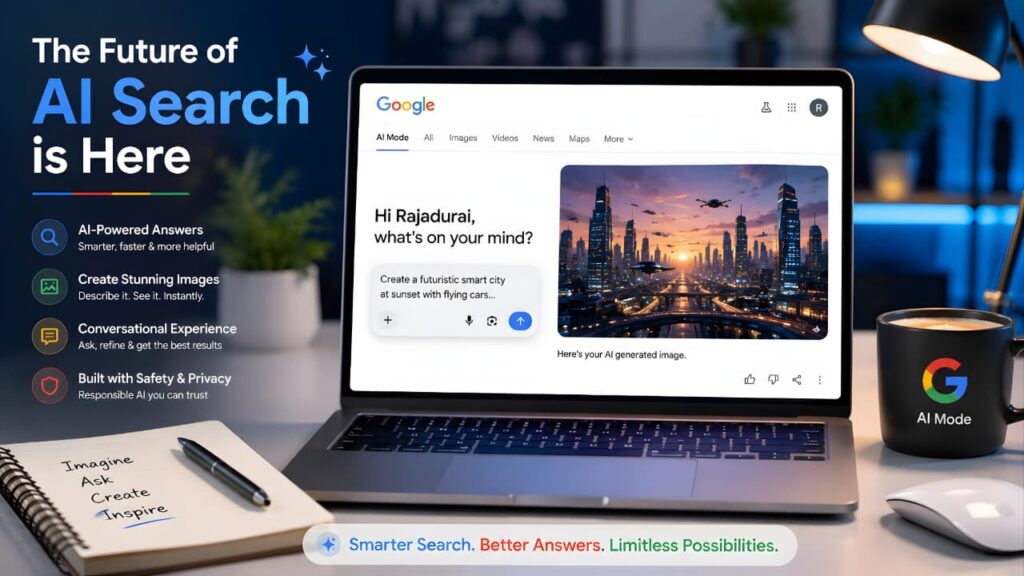
Whether you’re creating blog graphics, educational illustrations, marketing visuals, or simply experimenting with creative ideas, Google AI Mode Image Generation provides a simple and intuitive way to turn text prompts into original images directly within Google Search.
As the feature expands worldwide and Google adds more AI capabilities, users can expect an even richer search experience that blends research, creativity, and productivity into one powerful platform. Keeping up with these developments will help you make the most of Google’s latest AI innovations while staying ahead in the rapidly evolving world of artificial intelligence.