Phone scams are becoming more sophisticated every year. Fraudsters no longer rely only on unknown numbers or suspicious messages. Today, scammers can spoof trusted phone numbers, impersonate businesses, and even use AI-generated voices to deceive victims.
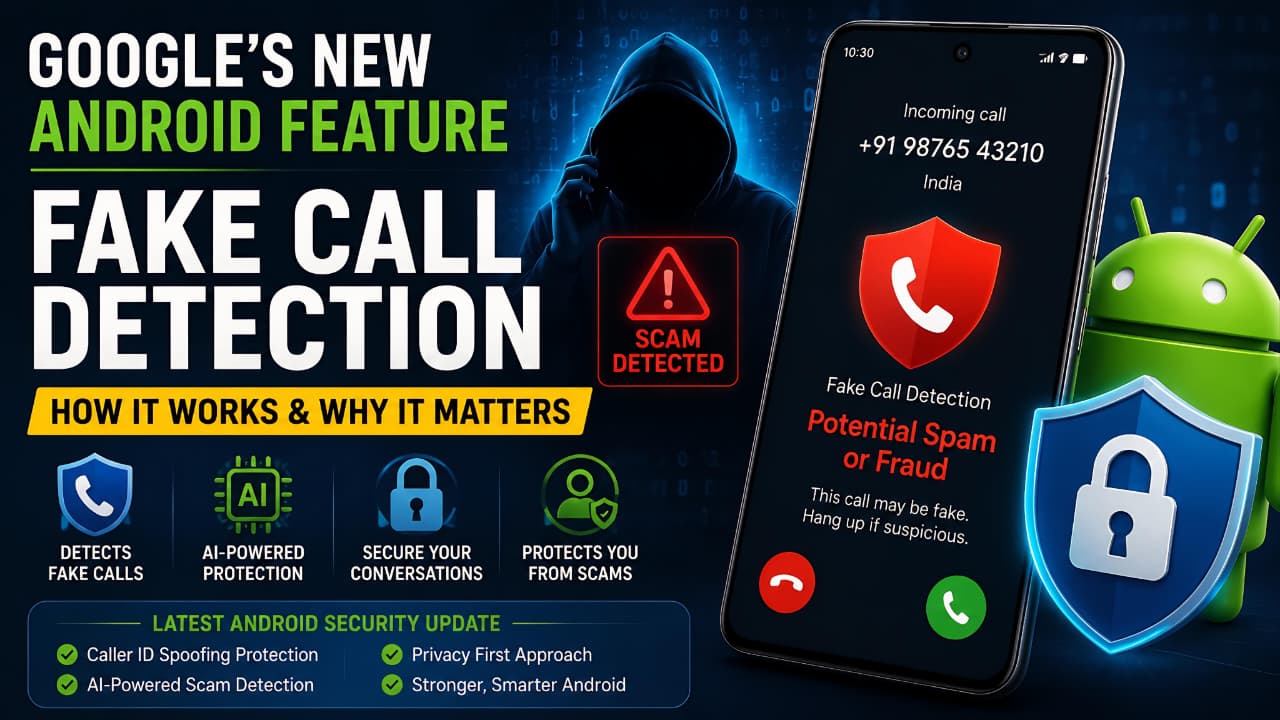
To address this growing threat, Google has introduced Fake Call Detection, a new Android security feature designed to help users identify potentially fraudulent calls before they fall victim to scams.
Google officially announced this feature as part of its latest Android Feature Drop, focusing on stronger protection against modern phone scams.
The feature is part of Google’s ongoing effort to strengthen Android security and provide users with better protection against modern cyber threats.
In this article, we’ll explore how Android Fake Call Detection works, why Google introduced it, its benefits, limitations, and what it means for Android users moving forward.
What Is Android Fake Call Detection?
Android Fake Call Detection is a security feature that helps users determine whether an incoming call is genuinely coming from the person or organization it claims to represent.
Traditionally, scammers have exploited caller ID systems by spoofing phone numbers. This allows them to make a call appear as if it is coming from a bank, government agency, delivery service, or even a family member.
Google’s new verification technology aims to reduce this risk by introducing a secure method for validating call authenticity.
Instead of relying solely on the displayed caller ID, Android can now use additional verification signals to determine whether a call is legitimate.
This gives users an extra layer of confidence before sharing sensitive information during a phone conversation.
Why Google Introduced This Feature
Phone scams have become a global problem.
According to cybersecurity reports, scammers increasingly use advanced techniques such as:
- Caller ID spoofing
- Voice cloning
- AI-generated conversations
- Social engineering attacks
- Banking and OTP fraud
These scams often create a sense of urgency, convincing victims to transfer money, share passwords, or reveal personal information.
As artificial intelligence becomes more accessible, the risk of highly convincing scam calls continues to rise.
Google introduced Fake Call Detection to help Android users identify suspicious calls more effectively and reduce the success rate of phone-based fraud.
The move aligns with Google’s broader mission of improving mobile security and protecting users from increasingly sophisticated cyber threats.
How Fake Call Detection Works
The core idea behind Fake Call Detection is simple: verify whether a caller is truly who they claim to be.
When a call is placed between supported devices and networks, Android can perform a secure verification process in the background.
Secure Verification Process
During the call setup process, Android exchanges encrypted verification signals between devices.
These signals help confirm:
- The caller’s identity
- Whether the call information has been altered
- Whether the call appears authentic
If the verification process succeeds, users can have greater confidence that the call is legitimate.
If verification fails or suspicious activity is detected, Android may display a warning indicating that the call could be fraudulent or spoofed.
How It Helps Protect Against Caller ID Spoofing
Caller ID spoofing is one of the most common tactics used by scammers.
For example:
A fraudster may make a call appear as if it comes from:
- Your bank
- A government office
- A courier service
- A trusted contact
Many users trust the caller ID shown on their screen and assume the call is genuine.
Fake Call Detection adds another layer of security by checking whether the caller can actually be verified instead of simply trusting the displayed number.
This makes spoofing attacks significantly less effective.
Protection Against AI-Powered Scam Calls
One of the most concerning developments in recent years is AI voice cloning.
Modern AI systems can replicate a person’s voice using only a short audio sample.
Scammers may use cloned voices to impersonate:
- Family members
- Friends
- Company executives
- Customer support agents
While Fake Call Detection cannot directly identify every AI-generated voice, it helps reduce the effectiveness of impersonation attacks by verifying call authenticity before the conversation begins.
This makes it harder for scammers to gain trust using fake identities.
Understanding how AI-generated voices work becomes easier when you learn about Multimodal AI Explained.
Benefits of Android Fake Call Detection
One of the biggest advantages of Android Fake Call Detection is its ability to help users identify suspicious calls before sharing personal information. As phone scams continue to evolve, Android Fake Call Detection provides an additional layer of security for everyday users.
Enhanced Security
The biggest advantage is improved protection against phone scams and fraud attempts.
Better Trust in Incoming Calls
Users can make more informed decisions when answering calls from unfamiliar numbers.
Reduced Financial Fraud
Many scams target banking information, OTPs, and payment details.
Verification warnings can help users avoid costly mistakes.
Protection for Elderly Users
Senior citizens are often targeted by phone scammers.
Fake Call Detection adds an extra layer of defense for vulnerable users.
Improved Digital Safety
As cyber threats evolve, additional verification tools become increasingly important for everyday smartphone users.
Which Devices Will Support the Feature?
Google is gradually rolling out Fake Call Detection across supported Android devices.
Availability may vary depending on:
- Android version
- Device manufacturer
- Region
- Carrier support
- Google Phone app compatibility
Google Pixel devices are typically among the first to receive new Android security features.
Other Android manufacturers may receive support as Google expands the rollout.
Users should keep their devices updated to access the latest security improvements.
As Android Fake Call Detection expands to more devices, users can expect stronger protection against caller ID spoofing and phone-based fraud.
Privacy and User Data Protection
Whenever a new security feature is introduced, privacy concerns naturally arise.
Google states that the verification process is designed with privacy in mind.
Key privacy principles include:
- Encrypted verification methods
- Limited data exposure
- Secure communication protocols
- Protection against unauthorized interception
The goal is to improve security without compromising user privacy.
Google continues to emphasize privacy-focused security features across the Android ecosystem.
Google says Android Fake Call Detection is designed to improve user security while maintaining privacy through secure verification methods and encrypted communication.
While Google’s Fake Call Detection feature adds an extra layer of protection against phone scams, users should also take steps to secure their Google accounts, as compromised accounts can often become targets for phishing attempts and identity-related fraud.
Additional Android Security Improvements
Fake Call Detection is part of a broader effort to enhance Android security.
Recent Android updates have also focused on:
Scam Protection Features
New tools help identify suspicious behavior during calls and messages.
Enhanced Personal Safety Tools
Android continues to improve emergency features and safety settings.
Improved Privacy Controls
Users now have greater visibility into app permissions and data access.
AI-Powered Security Systems
Machine learning is increasingly being used to identify threats before they impact users.
Together, these improvements create a stronger security environment for Android users worldwide.
Limitations of Fake Call Detection
Although the feature is promising, it is important to understand its limitations.
Not Every Scam Call Can Be Detected
Cybercriminals constantly adapt their techniques.
No security system can guarantee complete protection.
Rollout May Be Limited Initially
Some regions and devices may receive the feature later than others.
Network Compatibility Matters
Verification systems may require support from participating networks and devices.
User Awareness Is Still Important
Even with advanced security features, users should remain cautious when sharing personal information over the phone.
Technology can assist users, but awareness remains the strongest defense against scams.
Users should also understand How to Protect Your Personal Data Online to strengthen overall digital security.
Why This Feature Matters for Android Users
The smartphone has become the center of our digital lives.
We use it for:
- Banking
- Shopping
- Work
- Communication
- Identity verification
As our dependence on smartphones grows, so does the importance of protecting users from fraud.
Fake Call Detection represents a proactive step toward making phone communication more trustworthy in an era of AI-powered scams and sophisticated cybercrime.
By adding verification mechanisms directly into Android, Google is helping users stay safer without requiring additional apps or complicated security settings.
Many of these security innovations were highlighted in Latest Google Updates Explained.
Why Android Fake Call Detection Could Be a Game-Changer
Android Fake Call Detection represents a major step forward in smartphone security. With scam calls becoming increasingly sophisticated, Android Fake Call Detection could help millions of users avoid fraud and verify incoming calls more confidently.
Conclusion
Google’s new Android Fake Call Detection feature is a significant advancement in smartphone security.
By helping users verify incoming calls and identify potential spoofing attempts, the feature addresses one of the fastest-growing forms of digital fraud. As scammers increasingly use AI-generated voices, caller ID spoofing, and social engineering tactics, stronger verification tools are becoming essential.
While Fake Call Detection is not a complete solution to phone fraud, it provides an important layer of protection that can help users make safer decisions when answering calls.
For Android users, this feature is another example of how mobile security continues to evolve in response to modern threats. As the rollout expands, Fake Call Detection could become one of the most valuable security tools available on Android devices.
Users who receive suspicious account warnings should also read Google Critical Security Alert.
Frequently Asked Questions (FAQ)
1. What is Android Fake Call Detection?
Android Fake Call Detection is a security feature introduced by Google that helps users identify potentially fraudulent or spoofed phone calls. It uses verification technology to determine whether an incoming call is genuinely coming from the person or organization it claims to represent.
2. How does Fake Call Detection work?
The feature uses secure verification signals during the call setup process. These signals help confirm the authenticity of the caller and detect potential caller ID spoofing attempts. If verification cannot be completed, Android may display a warning to the user.
3. What is caller ID spoofing?
Caller ID spoofing is a technique used by scammers to make a phone call appear as if it is coming from a trusted source, such as a bank, government agency, or even someone from your contact list. This tactic is commonly used in phone scams and fraud attempts.
4. Can Fake Call Detection stop all scam calls?
No. While Fake Call Detection adds an important layer of protection, it cannot detect every scam call. Users should still remain cautious and avoid sharing personal, financial, or security-related information over the phone.
5. Does Fake Call Detection protect against AI voice scams?
The feature is designed to help verify call authenticity, which can reduce the effectiveness of AI-powered impersonation scams. However, it does not directly analyze or identify AI-generated voices during a call.
6. Which Android devices support Fake Call Detection?
Support depends on factors such as device model, Android version, region, carrier compatibility, and Google Phone app availability. Google Pixel devices typically receive new Android security features first.
7. Does Google record my calls for Fake Call Detection?
Google states that the feature uses secure verification methods designed to improve security while maintaining user privacy. The system focuses on call verification rather than recording personal conversations.
8. How can I stay safe from phone scams even with this feature enabled?
Follow these best practices:
- Never share OTPs over the phone.
- Avoid revealing banking credentials.
- Verify urgent requests independently.
- Be cautious of unknown callers.
- Hang up and call the organization directly using its official number.
- Keep your Android device updated with the latest security patches.
9.Why is Android Fake Call Detection important?
Android Fake Call Detection helps users identify potentially fraudulent calls, reduce the risk of caller ID spoofing, and improve overall smartphone security.