Artificial intelligence has moved far beyond simple chatbots. Today, developers, creators, students, and even beginners can use AI to create content, analyze files, generate images, write code, and build applications. One of the platforms making this easier is Google AI Studio.
Google AI Studio is Google’s web-based development environment for experimenting with Gemini models and building AI-powered applications. You can test prompts, work with different types of inputs, explore AI capabilities, manage API keys, and create prototypes without starting with a complicated development setup.
This Google AI Studio Complete Guide explains what the platform is, how it works, its major features, how beginners can get started, and what you should know before using it for serious projects.
What Is Google AI Studio?
Google AI Studio is a browser-based platform for experimenting with Gemini models and developing AI-powered applications.
Instead of installing a large development environment first, you can open AI Studio, sign in with a Google account, and begin testing prompts. The platform is useful for experimenting with text generation, multimodal inputs, image generation, coding, structured outputs, tools, and AI agents.
For developers, AI Studio also provides access to Gemini API projects and API keys. Google describes AI Studio as a place to test prompts, manage API keys, monitor usage, and build prototypes.
Google AI Studio is part of Google’s developer ecosystem for experimenting with Gemini models and building AI-powered applications. You can learn more about the platform and its latest capabilities on Google AI for Developers.
How to Get Started With Google AI Studio
Getting started is relatively simple.
Open Google AI Studio and sign in with your Google account. New users may have a project and API key created automatically. If you need another key, you can create one from the API Keys section.
Once you enter the workspace, you can experiment with prompts and select the model or capabilities that fit your task.
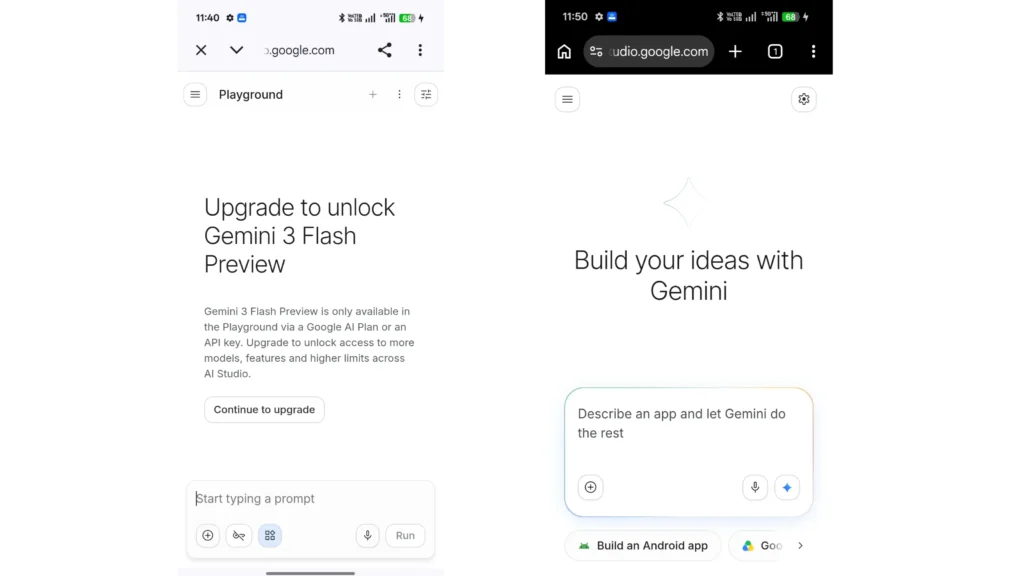
For example, you can ask Gemini to:
- Explain a complicated topic
- Summarize a document
- Analyze an image
- Write or debug code
- Create structured information
- Generate creative content
- Help design an AI-powered application
The best way to learn the platform is to start with a small task and gradually explore its more advanced tools.
Google AI Studio Complete Guide: Key Features
1. Gemini Model Playground
The core attraction of Google AI Studio is its access to Gemini models. You can experiment with different models and see how they respond to the same prompt.
This is particularly useful when you want to compare speed, reasoning ability, output quality, or suitability for a particular application.
Google’s current Gemini ecosystem supports capabilities such as text generation, multimodal understanding, structured output, function calling, image generation, video generation, and tool use.
2. Multimodal AI
Gemini is not limited to plain text.
Depending on the model and feature being used, you can work with different types of information, including images, documents, audio, and video. This makes AI Studio useful for tasks where understanding context from multiple formats is important.
For example, you could provide an image and ask Gemini to describe what it contains, or provide a document and ask it to extract important information.
Google’s documentation also highlights document understanding and large-context capabilities for Gemini models.
3. Image Generation and Editing
Google’s AI ecosystem also includes image-generation capabilities. AI Studio and the Gemini API can be used to experiment with AI-powered image generation and editing features supported by Google’s models.
This can be useful for prototypes, visual concepts, marketing experiments, and applications that need AI-generated imagery.
Google currently highlights Nano Banana-powered image generation and editing among its Gemini capabilities.
4. Build Mode
One of the most interesting features for beginners is AI Studio’s Build mode.
Instead of writing an entire application manually, you can describe what you want to build using natural language. Gemini can then help generate the application.
For example, you could describe an idea such as:
“Create a simple task management application with a dashboard, task categories, and a search feature.”
AI Studio can turn that description into a starting point for an application that you can continue refining.
Google describes Build mode as a way to create AI-powered applications from natural-language instructions, including full-stack web applications.
This makes the platform particularly interesting for people who have an application idea but do not have extensive coding experience.
Using Google AI Studio for Coding
AI Studio can also be useful for developers.
You can use Gemini to generate code, explain existing code, identify potential problems, and help with application development. The Gemini API provides several interfaces for integrating models into software, including standard content generation, streaming, and the newer Interactions API.
Google currently recommends the Interactions API for new Gemini projects. It is designed to support standard model interactions as well as multimodal and agentic workflows.
This means AI Studio can serve as a convenient place to experiment before integrating an AI feature into a larger application.
Working With Files and Large Amounts of Information
Another useful capability is the ability to work with large amounts of contextual information.
Gemini models can process documents and other multimodal inputs, allowing you to ask questions about information instead of manually searching through every page.
For example, a user could use an AI workflow to analyze a long document, identify important sections, summarize information, or extract specific details.
Gemini 3 documentation currently lists a context window of up to 1 million input tokens for supported Gemini 3 models, although exact limits and capabilities depend on the model being used.
Gemini can work with multimodal information and large amounts of context, making it useful for document and data-based AI applications. Google’s Gemini documentation explains these capabilities in more detail.
Google AI Studio and AI Agents
AI development is increasingly moving from simple question-and-answer systems toward AI agents that can perform multiple steps.
Google’s Gemini platform now includes agent capabilities that can use tools and perform multi-step tasks, depending on the model and configuration.
This opens up possibilities for building applications that do more than generate a single response.
For example, an agent-based workflow could research information, process data, perform calculations, and produce a final result as part of one larger task.
AI Studio can also be used to experiment with AI agents and agent-based workflows. Google’s Agents documentation explains how these systems can reason, use tools, execute code, and work with files.
API Keys and Developer Access
If you want to connect Gemini to your own application, you will usually need a Gemini API key.
Google AI Studio provides tools for creating and managing API keys associated with Google Cloud projects. API access can then be used from supported programming environments such as Python, JavaScript, or REST.
One important point is security. An API key should not simply be exposed in public client-side code. Google has also introduced authorization keys and additional security controls as part of its transition toward more secure API authentication.
If you are building a public application, API-key management should therefore be treated as an important part of the development process.
Is Google AI Studio Free?
Google AI Studio itself is available at no charge, while Gemini API usage can have model-specific free limits and paid tiers.
Google provides free access to certain models and usage levels, while higher limits and paid capabilities may require billing. Usage can be monitored through the AI Studio dashboard.
This means you should check the current pricing and usage limits before building an application that expects significant traffic.
The availability of free access should not be confused with unlimited usage. Limits can vary between models and account tiers.
Google provides a free tier for certain Gemini API models and AI Studio usage, while paid tiers offer higher limits and additional capabilities. You can check the latest Gemini API pricing before starting a larger project.
Google AI Studio vs. Gemini App
Google AI Studio and the consumer Gemini app serve different purposes.
The Gemini app is primarily designed for everyday users who want to interact with Google’s AI assistant.
Google AI Studio is more focused on experimentation and development. It provides access to model controls, API functionality, prototyping tools, and developer-oriented features.
In simple terms, the Gemini app is designed around using AI, while AI Studio is designed around experimenting with and building with AI.
Who Should Use Google AI Studio?
Google AI Studio can be useful for several types of users.
Beginners can experiment with AI without immediately setting up a complete development environment.
Content creators can test prompts and explore AI-assisted workflows.
Students can use it for learning programming concepts and understanding how modern AI systems work.
Developers can prototype applications and test Gemini API capabilities.
Businesses and startups can experiment with AI-powered product ideas before investing significant development resources.
The exact usefulness depends on the project, but the platform’s combination of experimentation and development tools makes it more than a basic chatbot interface.
Tips for Getting Better Results
The quality of your result often depends on the quality of your instructions.
Instead of asking:
“Write an article about smartphones.”
Give the model useful context, such as the target audience, purpose, tone, structure, length, and information that must be included.
You can also ask for a specific output format when building applications. Gemini supports structured outputs and function calling, which can make AI responses easier to process programmatically.
For development work, test your prompts with different examples rather than assuming the first result is production-ready.
If you want to explore more ready-made AI prompt ideas, you can also check out our Prompt Gallery – AI Prompts guide.
Final Thoughts
Google AI Studio has become an important entry point for people who want to experiment with Google’s Gemini technology without building everything from scratch.
Its capabilities now extend beyond simple text generation. Depending on the model and workflow, users can work with multimodal information, generate images, process documents, write code, use tools, build applications, and experiment with AI agents.
For beginners, the biggest advantage is the ability to start experimenting quickly. For developers, the combination of AI Studio and the Gemini API provides a practical path from an early prototype to a more complete AI-powered application.
If you are interested in learning how modern generative AI works or want to build your own AI-powered project, Google AI Studio is a useful platform to explore. Just remember that model capabilities, pricing, API limits, and available features can change over time, so checking Google’s current documentation before starting a production project is always a good idea.