Creating videos consistently is not just about recording and uploading content. You also need to understand what your audience wants, identify useful topics, review your channel performance, and decide what to create next.
This is where YouTube Ask Studio can be useful.
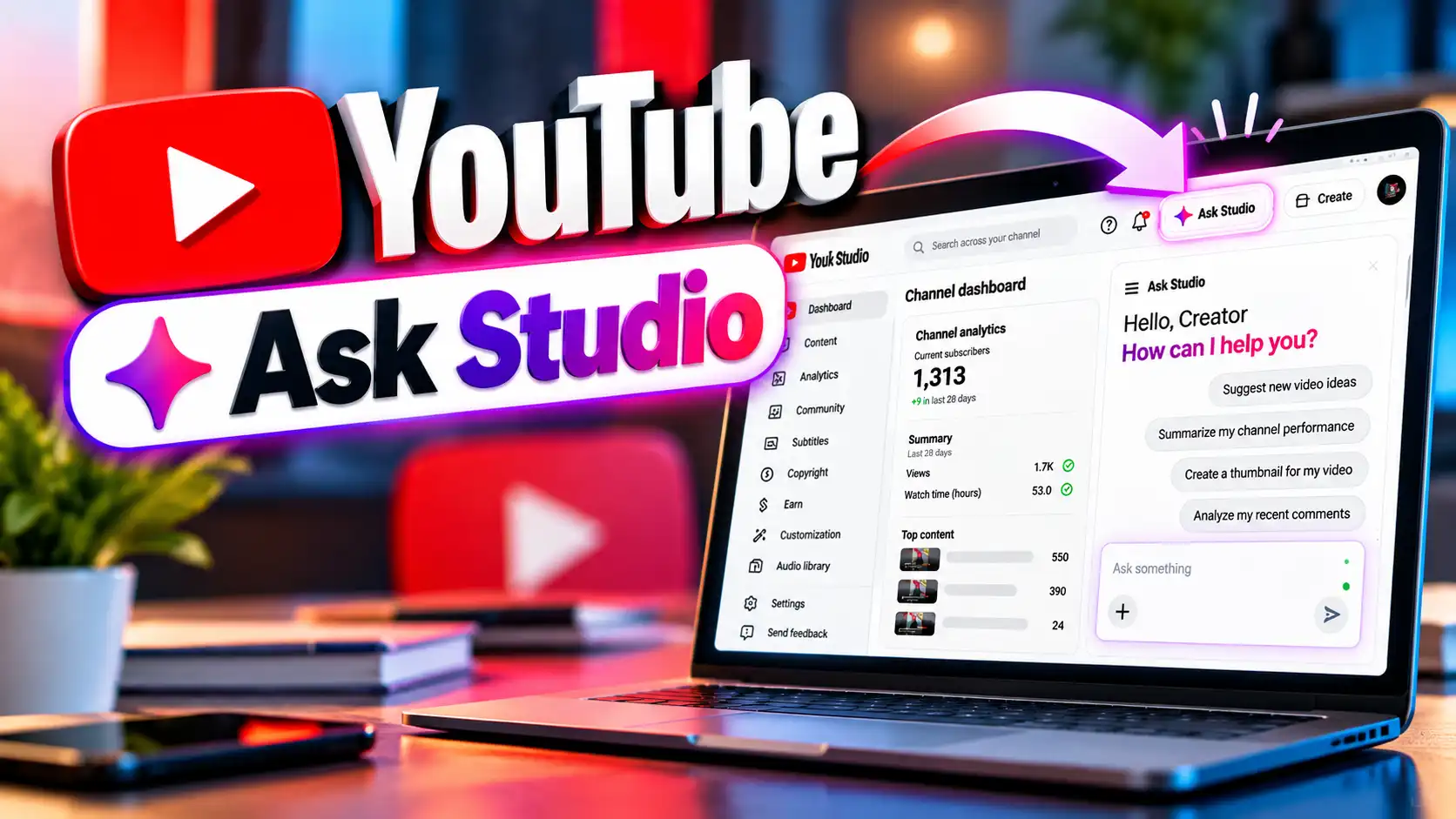
Ask Studio is an AI-powered feature built directly into YouTube Studio. It can help creators brainstorm video ideas, understand channel and audience information, analyze performance, review comments, and get feedback on creative work.
Instead of checking different parts of YouTube Studio and trying to connect the information yourself, you can ask questions in natural language and use the responses as a starting point for your next decision.
What Is YouTube Ask Studio?
YouTube Ask Studio is an AI creative partner available inside YouTube Studio. It is designed to help creators explore ideas, understand their channel, and make sense of performance and audience feedback.
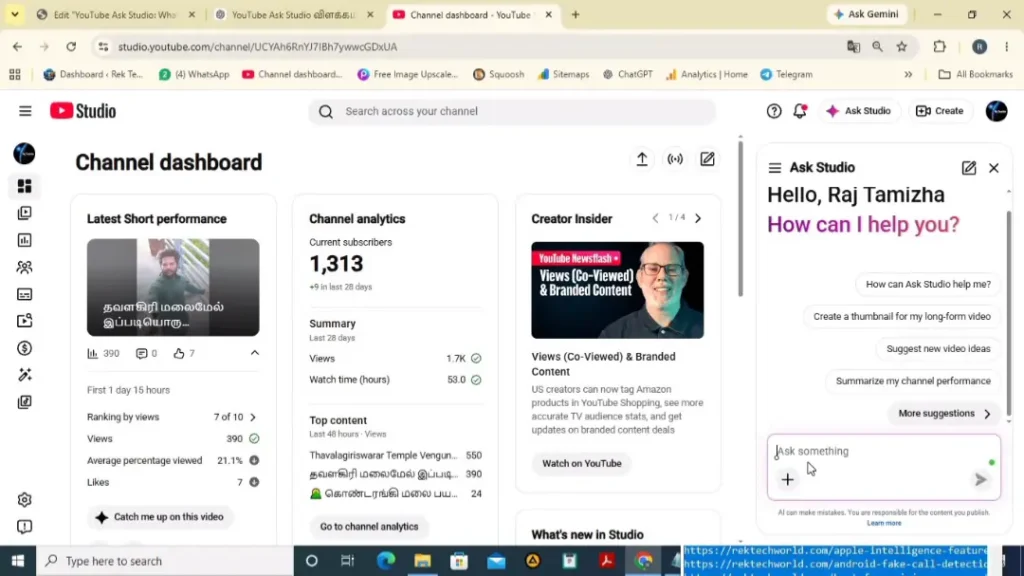
You can type a question in your own words rather than using a complicated command. For example, you could ask what viewers are discussing in the comments of a recent video or how a particular video has been performing.
Ask Studio uses information from your channel, YouTube, and the web to generate responses. However, its answers can vary in quality and accuracy, so creators should use their own judgment when making decisions.
YouTube provides detailed information about how Ask Studio works, its availability, and the types of questions creators can ask. For the latest official details, you can refer to the YouTube Help guide for Ask Studio.
What Can You Do With YouTube Ask Studio?
The usefulness of Ask Studio comes from the different ways you can interact with your channel information.
1. Find New Video Ideas
Running out of ideas is a common problem for creators. Ask Studio can help you brainstorm topics based on your channel and audience.
For example, you can ask:
“Based on my recent videos, suggest five topics I could cover next.”
You can then continue the conversation and ask for more specific ideas, different angles, or concepts designed for a particular type of viewer.
This makes the idea-generation process more practical because you can build on information from your own channel rather than starting from a blank page.
2. Understand What Your Audience Is Talking About
Comments can contain valuable information about what viewers enjoyed, what they found confusing, and what they want to see next.
Ask Studio can help identify common themes in comments and summarize viewer feedback.
A useful prompt could be:
“What are the main themes in the comments on my recent video?”
You can follow that with another question such as:
“Based on this feedback, what video topics should I consider next?”
YouTube specifically recommends using clear, specific questions and following up with additional prompts to get more useful results.
3. Analyze Video Performance
Instead of looking at individual analytics numbers without context, you can use Ask Studio to ask questions about your video performance.
For example:
“How did my latest video perform recently?”
You can also ask about specific metrics or areas of your analytics when you want to understand what happened with a particular video.
Ask Studio can also be accessed from the Analytics page, where suggested prompts can help you explore your channel metrics in more detail.
4. Discover Audience Trends
Your audience can change over time. The topics that attract attention today may not be the same ones that worked several months ago.
Ask Studio can help you examine audience trends and identify patterns that may be useful when planning future content.
For example:
“What topics seem to be getting the most interest from my audience?”
The answer can give you another perspective when deciding which subjects deserve more attention.
5. Get Feedback on a Video Script
Ask Studio is not limited to analytics and ideas. You can also paste a video script into the chat and ask for feedback based on YouTube’s creative best practices.
For example:
“Review this script and suggest ways to improve the opening and overall flow.”
This can be useful before recording because you can identify areas that may need clarification or a stronger introduction.
YouTube says creators can copy and paste scripts into Ask Studio to receive creative feedback.
6. Review a Video Before Publishing
Creators can also use Ask Studio to get feedback on unpublished content. You can select draft, private, or unlisted videos from your channel and ask for suggestions.
According to YouTube, these suggestions can take creative best practices and historical retention data into account. The recommendations are suggestions, so the creator remains in control of what changes to make.
7. Get Feedback Using Images
Visual information can also be added to Ask Studio. YouTube says creators can upload up to 10 images directly to a chat prompt.
This can be useful when brainstorming visual concepts, reviewing channel data, developing thumbnail ideas, or asking for visual feedback.
For example, instead of only describing a thumbnail, you can provide the image and ask:
“What could I improve in this thumbnail to make the main idea clearer?”
8. Save Useful Ideas
If Ask Studio produces an idea that you want to keep, you can save it as an Idea card.
This can be useful when you are brainstorming several topics at once. Instead of trying to remember every suggestion, you can save the ideas that are worth revisiting later.
How to Use YouTube Ask Studio
Getting started is relatively simple.
- Sign in to YouTube Studio from a computer.
- Open Ask Studio from the available option in YouTube Studio.
- Choose one of the suggested prompts or type your own question.
- Review the response.
- Ask a follow-up question if you need more detail.
- Save useful ideas when appropriate.
YouTube recommends starting with a clear objective and being specific about what you want to know. A detailed question generally gives the AI more useful context than a very broad request.
Useful Questions to Ask YouTube Ask Studio
The quality of the conversation depends heavily on the question you ask. Here are some practical examples:
- “What video should I make next based on my recent content?”
- “What topics are my viewers most interested in?”
- “What are viewers saying about my latest video?”
- “What common questions appear in my recent comments?”
- “Why did my latest video perform differently from my previous videos?”
- “Give me five content ideas based on viewer feedback.”
- “What patterns can you find in my recent video performance?”
- “Review this script and suggest improvements to the opening.”
- “What could I improve in this video before publishing?”
- “Suggest follow-up video ideas based on this topic.”
You do not have to use complicated prompts. YouTube recommends using natural language and treating the interaction more like a conversation with a creative partner.
How to Get Better Results From Ask Studio
A simple question can produce a useful answer, but adding context can make the conversation more productive.
Instead of asking:
“Give me video ideas.”
Try something more specific:
“Based on my recent technology videos and the interests of my audience, suggest five topics for my next long-form videos.”
You can then continue with a follow-up:
“Which of these ideas is most closely related to the topics my viewers have recently discussed?”
This conversational approach lets you refine an idea instead of accepting the first response.
YouTube also recommends experimenting with different wording and using follow-up questions when the first response does not provide exactly what you need.
Can Ask Studio Help With YouTube Problems?
Ask Studio can also handle certain technical and channel-management questions within the YouTube Studio workflow.
For example, YouTube says creators can ask about upload errors, monetization appeal status, specific policy strikes, and other channel-related support questions. However, Ask Studio should not be confused with YouTube’s dedicated creator support system.
For complicated support situations, it is still important to use the appropriate YouTube Help or creator support options when available.
What Are the Limitations of YouTube Ask Studio?
Ask Studio can be helpful, but it should not replace your own judgment.
YouTube states that the quality and accuracy of responses can vary. Some questions may also require information or capabilities that Ask Studio does not currently have. In those situations, it may provide a general answer or say that it cannot help with the request.
It is therefore better to treat its responses as guidance rather than automatically accepting every suggestion.
Creators should also avoid relying on Ask Studio for professional medical, legal, or financial advice.
Like other AI-powered tools, Ask Studio responses may vary in quality and accuracy. YouTube recommends using your own judgment when reviewing its responses. You can learn more in the official Ask Studio documentation.
Is YouTube Ask Studio Available to Everyone?
Ask Studio is available to most YouTube creators globally, although access can depend on eligibility.
YouTube currently says the feature is available through a web browser on a computer. Official Artist Channels, Made for Kids channels, and creators under 18 do not have access to Ask Studio. If the option does not appear in your YouTube Studio, your channel may not currently have access to the feature.
Availability and feature behavior can change as YouTube continues to develop the tool.
Frequently Asked Questions
What is YouTube Ask Studio?
YouTube Ask Studio is an AI-powered feature built into YouTube Studio that helps creators brainstorm ideas, understand channel information, analyze performance, and review audience feedback.
Can Ask Studio give video ideas?
Yes. You can ask it to brainstorm new video ideas based on your channel, audience, or existing content.
Can Ask Studio analyze YouTube comments?
Yes. Ask Studio can help summarize and identify themes in comments on your videos.
Can I ask Ask Studio about my video performance?
Yes. You can ask questions about your channel performance and individual videos, including questions related to analytics.
Can Ask Studio review a script?
Yes. You can paste a script into Ask Studio and request feedback based on creative best practices.
Can I use Ask Studio before publishing a video?
Yes. YouTube says creators can get feedback on draft, private, and unlisted videos before publishing.
Is Ask Studio available on mobile?
YouTube’s current Help documentation says Ask Studio is available on web browsers on a computer. If you do not see the feature, your channel may not currently have access.
Final Thoughts
YouTube Ask Studio can be a useful companion for creators who want to spend less time digging through information and more time turning that information into better content.
Its biggest value is not simply generating random ideas. The more useful approach is to ask specific questions about your own videos, audience feedback, performance, and future content plans.
Use it to explore possibilities, understand your channel more clearly, and improve your creative process. Then combine its suggestions with your own experience and judgment before making the final decision.
As YouTube continues to develop Ask Studio, the feature may gain additional capabilities over time. For creators, learning how to ask clear questions and use the responses thoughtfully can make the tool much more useful in everyday content planning.