
WhatsApp is introducing A major privacy-focused update with the new WhatsApp Username feature. Instead of sharing your phone number with everyone you want to chat with, you’ll be able to use a unique username in supported situations. This gives users more control over their privacy while making it easier to connect with new people.
To help users secure the username they want, WhatsApp has started rolling out username reservations before the complete feature becomes widely available. If the feature is available for your account, you can reserve your preferred username before the wider rollout.
In this guide, you’ll learn what WhatsApp Username is, why WhatsApp introduced it, who can access the feature, and how the rollout works based on official information released by WhatsApp and Meta.
As WhatsApp continues to introduce new privacy-focused features, keeping up with the latest WhatsApp updates can help you make the most of your account and understand how new features become available over time.
What Is WhatsApp Username?
A WhatsApp Username is an optional identifier that lets people contact you without immediately seeing your phone number in supported scenarios.
Your phone number is still required to create and use a WhatsApp account. The username does not replace your registered mobile number. Instead, it provides an additional identity that you can share when you don’t want to give your personal phone number to someone new.
This feature is designed to make conversations more private while giving users greater control over how they are discovered and contacted.
This feature is designed to make conversations more private while giving users greater control over how they are discovered and contacted. You can also explore other hidden WhatsApp features to get even more out of the app.
This feature is designed to make conversations more private while giving users greater control over how they are discovered and contacted. For a detailed overview of this feature, you can read the official WhatsApp Username announcement published by WhatsApp.
Key Highlights
- Usernames are optional.
- Your phone number remains linked to your WhatsApp account.
- Usernames are designed to improve privacy.
- Every username must be unique.
- Username reservations are being rolled out in phases.
Quick Overview
| Feature | Details |
|---|---|
| Feature Name | WhatsApp Username |
| Purpose | Help users connect without immediately sharing their phone number in supported situations |
| Phone Number Required | Yes |
| Username Required | No (Optional) |
| Availability | Rolling out gradually to eligible users |
Why WhatsApp Introduced Usernames
Privacy has become increasingly important as more people use messaging apps for work, education, business, and personal communication.
Previously, starting a conversation on WhatsApp almost always required sharing your phone number. While this works well for trusted contacts, it isn’t always ideal when communicating with people you don’t know personally.
By introducing usernames, WhatsApp aims to:
- Reduce unnecessary phone number sharing.
- Give users more control over their privacy.
- Make it easier to connect safely with new people.
- Offer a more flexible way to identify yourself.
The feature is especially useful for people who interact with customers, classmates, community members, or online contacts without wanting to share their personal number immediately.
Availability and Rollout
WhatsApp is introducing username reservations in phases. This means the feature may not appear for every user at the same time.
If you don’t see the Username option yet, it doesn’t necessarily mean your account isn’t eligible. WhatsApp is gradually expanding availability to more users over time.
Availability can depend on:
- Your WhatsApp app version.
- Your account’s eligibility.
- The phased rollout schedule.
To improve your chances of receiving the feature early:
- Keep WhatsApp updated to the latest version.
- Enable automatic app updates.
- Watch for announcements from WhatsApp inside the app or on its official channels.
As the rollout expands, more users will be able to reserve their preferred usernames before the wider launch.
The rollout schedule may vary depending on your account and region.
As the rollout expands, more users will be able to reserve their preferred usernames before the wider launch. You can also check the latest WhatsApp upcoming features to see what new tools are expected in future updates.
Key Takeaways
- WhatsApp Username is an optional privacy feature.
- Your phone number is still required for your account.
- Usernames provide an additional way to identify yourself.
- Username reservations are being released gradually.
- Reserving your preferred username early can help you secure the name you want before it becomes unavailable.
How to Reserve Your WhatsApp Username
If the username reservation feature is available for your account, reserving your preferred WhatsApp Username is a simple process. WhatsApp is releasing the feature in stages, so the option may not appear for everyone immediately.
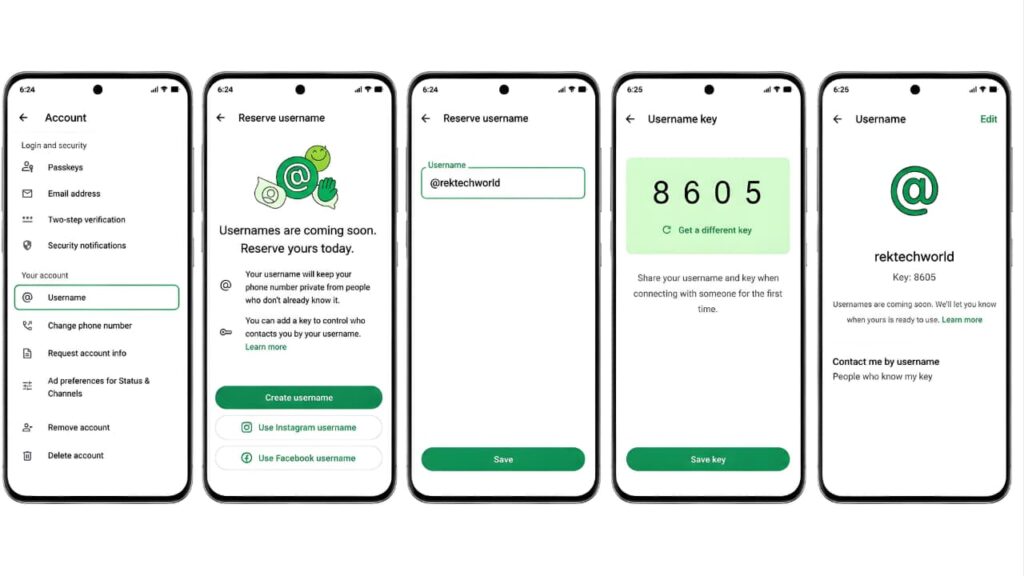
Follow these steps:
- Open WhatsApp.
- Go to Settings > Account.
- Tap Username.
- Tap Create Username.
- Enter your preferred username.
- Check username availability.
- Tap Save.
- Set up your Username Key (optional but recommended for added privacy).
- Share your username and key only with people you trust.
Before reserving your username, it’s always a good idea to review the latest guidance available in the official WhatsApp Help Center to ensure you’re following the most up-to-date instructions.
If you don’t see the Username option yet, keep your app updated and wait for the feature to reach your account as the rollout continues.
WhatsApp Username Rules
To help prevent confusion and impersonation, WhatsApp requires every username to follow specific validation rules.
| Rule | Requirement |
|---|---|
| Length | Must contain between 3 and 35 characters. |
| Letters | Must include at least one letter. |
| Unique | Each username must be unique. |
| Beginning | Cannot start with “www.” |
| Ending | Cannot end with a domain such as “.com” or “.net”. |
| Validation | Must comply with WhatsApp’s username requirements. |
Because username requirements may change as the feature expands globally, always check the official WhatsApp Help Center for the latest validation rules and eligibility requirements.
If your preferred username is already taken, you’ll need to choose another available name before you can continue.
Username Key
Alongside usernames, WhatsApp is introducing an optional Username Key to provide an additional layer of privacy.
When enabled, someone who wants to contact you for the first time may need both your WhatsApp Username and your Username Key. This helps reduce unwanted messages and gives you greater control over who can reach you.
Because this is a new feature, availability may vary during the rollout.
To learn more about how Meta is expanding privacy and security features across its platforms, visit the official Meta Newsroom for the latest announcements.
Privacy Features
Privacy is the primary reason WhatsApp introduced usernames.
Instead of sharing your mobile number with every new contact, you’ll be able to share your WhatsApp Username where the feature is supported. Your phone number remains part of your account, but usernames provide another way to identify yourself without immediately exposing your personal number.
According to WhatsApp, the feature includes several privacy-focused improvements:
- Usernames are optional.
- There is no public directory of usernames.
- Your phone number is still protected by WhatsApp’s existing privacy settings.
- Usernames are designed to reduce unnecessary phone number sharing in supported conversations.
These improvements are intended to make it easier to communicate with new people while giving users more control over their personal information.
These improvements are intended to make it easier to communicate with new people while giving users more control over their personal information. Learning how to protect your personal data online can further strengthen your digital privacy.
If you want to learn more about WhatsApp’s approach to user privacy, you can also read about the WhatsApp privacy policy and the latest developments surrounding it.
Creators and Businesses
WhatsApp has also announced support for creators, businesses, and organizations that want a consistent identity across Meta platforms.
Eligible accounts may be able to reserve the same username they already use on Facebook or Instagram, subject to availability and WhatsApp’s eligibility requirements.
Using the same username across multiple platforms can help customers and followers recognize your brand more easily while maintaining a consistent online identity.
Frequently Asked Questions (FAQs)
1. What is a WhatsApp Username?
A WhatsApp Username is an optional identity that allows eligible users to connect without immediately sharing their phone number in supported situations. Your phone number is still required to register and use WhatsApp.
2. Is the WhatsApp Username feature available for everyone?
No. WhatsApp is rolling out the feature gradually, so it may not be available on every account at the same time.
3. Do I still need my phone number?
Yes. A valid phone number is still required to create and maintain your WhatsApp account.
4. Is reserving a WhatsApp Username free?
Yes. WhatsApp has announced username reservations as part of the app, with no separate fee.
5. Can two people have the same username?
No. Every WhatsApp Username must be unique.
6. Can I change my WhatsApp Username later?
Yes. WhatsApp allows users to change their username, subject to the latest rules and availability.
7. Can people search for my username?
WhatsApp has stated that there is no public username directory. People cannot browse usernames through a public list.
8. What should I do if my preferred username is unavailable?
Choose another unique username that reflects your personal name, business, or brand.
If you experience problems after updating WhatsApp or enabling new features, our guide on WhatsApp not sending messages can help you troubleshoot the issue quickly.
Watch the Full Video Tutorial
If you prefer a visual walkthrough, watch our complete YouTube video tutorial to learn how to reserve your WhatsApp Username, create a Username Key, and configure the latest privacy settings step by step.
Conclusion
The WhatsApp Username feature is one of WhatsApp’s most significant privacy improvements in recent years. It gives users a new way to connect while reducing the need to share a personal phone number in supported situations.
If username reservation is available for your account, it’s a good idea to reserve your preferred WhatsApp Username as If the feature is available for your account, consider reserving your preferred username before it becomes unavailable. Since every username must be unique, popular names may become unavailable as more users gain access to the feature.
Keep your WhatsApp app updated and follow official announcements from WhatsApp for the latest information about the rollout and new privacy features.
Keeping WhatsApp updated is important, but you should also protect your Google account to improve your overall online security and safeguard your personal information.