For decades, passwords have been the standard way to protect online accounts. Whether you’re signing in to Gmail, social media platforms, banking apps, or online shopping websites, passwords have always been the first line of defense.
However, the internet has changed dramatically.
Today, cybercriminals use advanced phishing attacks, data breaches, credential stuffing attacks, malware, and social engineering techniques to steal passwords from unsuspecting users. Even strong passwords can become vulnerable when they are reused across multiple websites or exposed in large-scale security breaches.
To address these security challenges, major technology companies such as Google, Apple, and Microsoft have started promoting a new authentication method known as Passkeys.
Google Passkeys are designed to provide a faster, safer, and more convenient way to sign in without relying entirely on traditional passwords. Instead of remembering complex passwords, users can authenticate themselves using biometric verification such as fingerprints, facial recognition, or device screen locks.
As online threats continue to evolve, many security experts believe passkeys represent the future of account security.
Google explains that Passkeys provide a simpler and more secure sign-in experience while helping protect users against phishing attacks and password theft.
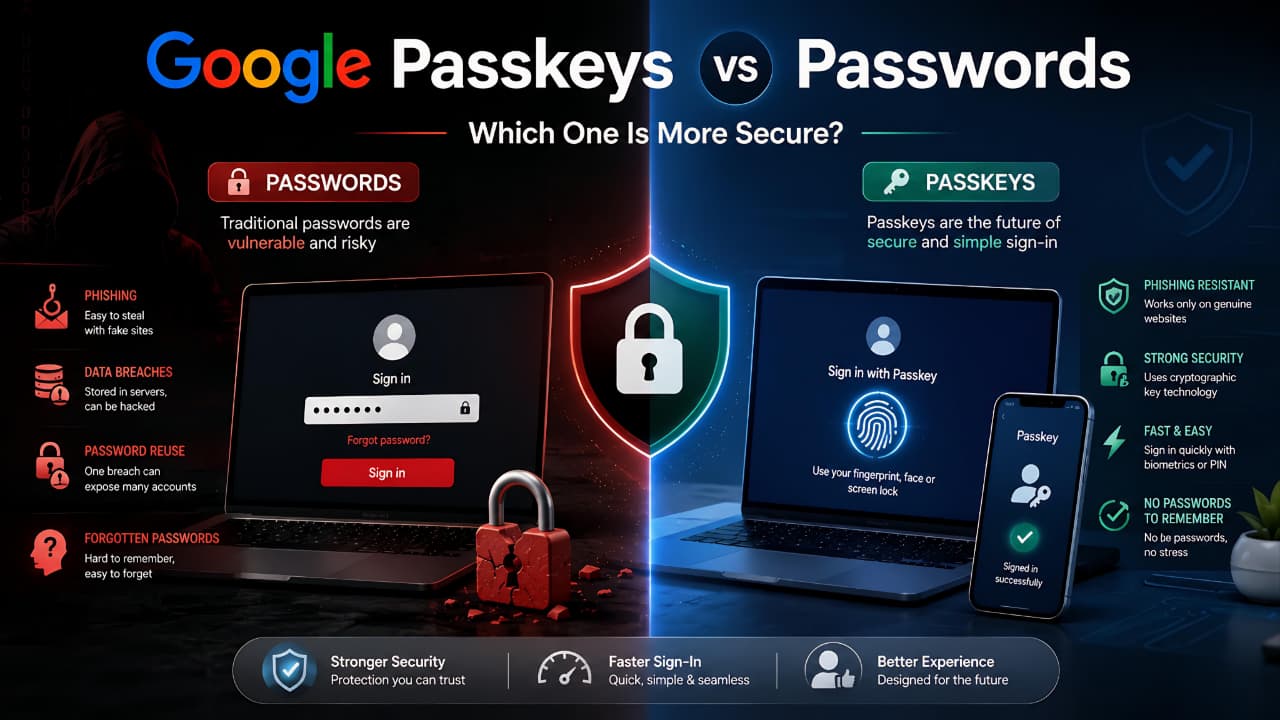
As online threats continue to evolve, understanding the differences between Google Passkeys vs Passwords can help users make better security decisions and protect their accounts more effectively.
What Is a Google Passkey?
A Google Passkey is a secure digital credential that allows users to sign in to their Google account without entering a traditional password.
Instead of relying on something you remember, such as a password, passkeys rely on something you own and control, such as your smartphone, tablet, laptop, or trusted device.
When you create a passkey, your device generates a pair of cryptographic keys:
- A public key
- A private key
The public key is stored by the service you are signing in to, while the private key remains securely stored on your device.
Because the private key never leaves your device, attackers cannot steal it through traditional phishing attacks or data breaches.
This technology makes passkeys significantly more secure than passwords in many situations.
Understanding Google Passkeys vs Passwords is important because both authentication methods offer different levels of convenience, security, and protection against cyber threats.
How Passkeys Are Different From Passwords
Traditional passwords require users to:
- Create a password
- Remember the password
- Enter the password
- Reset the password if forgotten
Passkeys eliminate many of these steps.
Instead of typing a password, users can verify their identity using:
- Fingerprint authentication
- Face recognition
- Device PIN
- Device screen lock
This creates a faster and more secure login experience.
Why Google Is Promoting Passkeys
Google has publicly stated that passwords remain one of the weakest links in online security.
Common password-related problems include:
- Weak passwords
- Password reuse
- Forgotten passwords
- Phishing attacks
- Data breaches
Passkeys help address these issues by removing the need to remember passwords altogether.
Google’s authentication system uses modern cryptographic standards developed through industry collaboration with organizations such as the FIDO Alliance.
Google provides additional information about how Passkeys for Google Accounts work and why they are considered more secure than traditional passwords.
As online security threats continue to grow, understanding Google Passkeys vs Passwords can help users choose a safer authentication method for their accounts.
As Google continues to improve account security, users are increasingly encouraged to move beyond traditional passwords and adopt modern authentication methods. Understanding recent latest Google updates explained can help users stay informed about new security features and account protection improvements.
Why Traditional Passwords Are No Longer Enough
Passwords have protected online accounts for many years, but they were never designed for today’s threat landscape.
Cybercriminals have developed numerous techniques for stealing passwords at scale.
As a result, even strong passwords may not provide adequate protection on their own.
Let’s look at some of the biggest challenges associated with passwords.
The growing discussion around Google Passkeys vs Passwords highlights why many technology companies are moving away from traditional password-based authentication.
Password Reuse
Many users reuse the same password across multiple websites.
While this may seem convenient, it creates a major security risk.
If one website suffers a data breach, attackers can attempt to use the same password on:
- Google accounts
- Social media accounts
- Banking services
- Shopping websites
This attack method is known as credential stuffing.
A single compromised password can potentially expose multiple accoun
Data Breaches
Large-scale data breaches occur regularly across the internet.
When companies experience security incidents, attackers may gain access to:
- Usernames
- Passwords
- Email addresses
- Personal information
Once passwords become publicly available, they can be used to target additional services.
Passkeys reduce this risk because there is no traditional password database that attackers can steal.
Phishing Attacks
Phishing remains one of the most effective cyberattack methods.
Attackers create fake login pages designed to trick users into entering their credentials.
Even experienced users occasionally fall victim to sophisticated phishing campaigns.
Learning how to identify fake websites can help users avoid phishing attacks and reduce the risk of credential theft.
Because passkeys are tied to specific websites and domains, they provide significantly stronger protection against phishing attacks.
Forgotten Passwords
Another common problem is password management.
Many users struggle to remember:
- Complex passwords
- Unique passwords
- Multiple account credentials
This often leads to:
- Password reuse
- Weak passwords
- Frequent password reset requests
Passkeys simplify the process by allowing users to authenticate using devices they already own.
This is one of the main reasons why discussions about Google Passkeys vs Passwords have become increasingly popular among security experts.
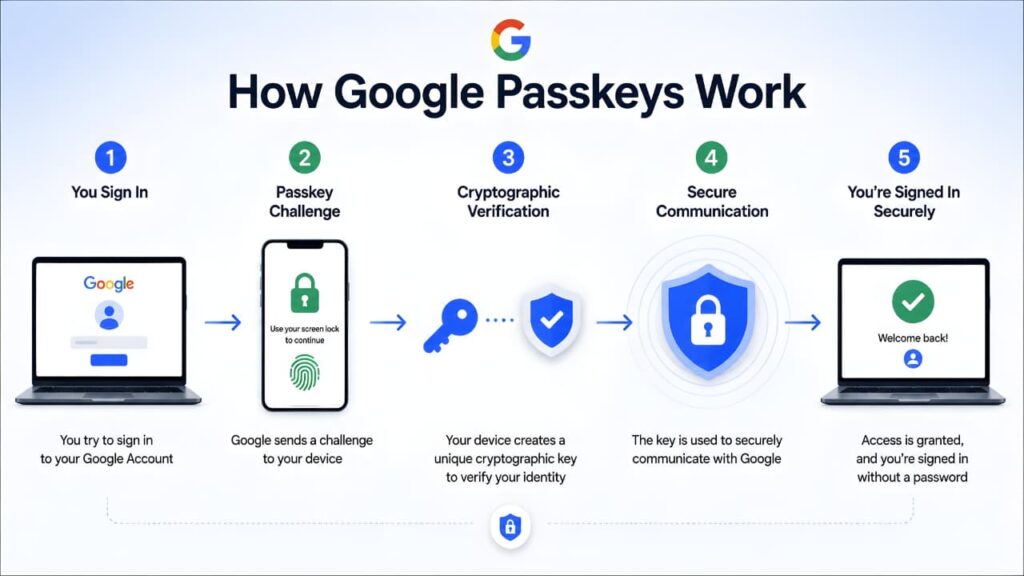
How Google Passkeys Work
Understanding how passkeys work helps explain why they are becoming increasingly popular.
Unlike passwords, passkeys use public-key cryptography.
When a passkey is created:
- A public key is stored by the website or service.
- A private key remains securely stored on your device.
During login:
- The website requests authentication.
- Your device verifies your identity.
- The private key confirms the authentication request.
- Access is granted.
The private key never leaves your device.
This is one of the primary reasons passkeys are considered highly secure.
Device-Based Authentication
Passkeys rely on trusted devices.
Examples include:
- Android smartphones
- iPhones
- Tablets
- Laptops
- Desktop computers
Because authentication occurs on trusted devices, attackers have fewer opportunities to intercept credentials.
These security improvements clearly demonstrate why Google Passkeys vs Passwords is becoming one of the most discussed topics in modern cybersecurity.
Biometric Verification
Most passkey systems support biometric authentication.
Examples include:
- Fingerprint scanning
- Face recognition
- Device biometrics
This allows users to authenticate quickly without entering passwords.
Secure Sign-In Experience
One of the biggest advantages of passkeys is convenience.
Users no longer need to:
- Create complex passwords
- Memorize passwords
- Regularly reset passwords
Instead, authentication happens using secure methods already available on their devices.
Learning how passkeys function makes it easier to understand the security advantages of Google Passkeys vs Passwords in real-world situations.
Google’s security team explains how Authentication Tools for Secure Sign-In help users access accounts securely while reducing dependence on traditional passwords.
Why Passkeys Are Resistant to Phishing
Traditional phishing attacks rely on convincing users to enter passwords into fake websites.
Passkeys work differently.
Because passkeys are linked to specific websites and domains, they cannot be easily used on fake websites.
This makes phishing attacks significantly less effective.
Strengthening your overall account protection strategy and learning how to protect your Google account can further reduce the risk of unauthorized access and online threats.
Passwords vs Passkeys: The Security Shift
The internet is gradually moving toward passwordless authentication.
Major technology companies are investing heavily in passkey technology because it offers:
- Better security
- Faster authentication
- Reduced phishing risk
- Improved user experience
While passwords are unlikely to disappear overnight, passkeys are rapidly becoming a preferred authentication method for many online services.
In the next section, we’ll directly compare Google Passkeys and traditional passwords and explore the key reasons why passkeys are replacing passwords faster than expected.
Google Passkeys vs Passwords: A Detailed Comparison
Both passwords and passkeys are designed to protect online accounts, but they work in very different ways.
Passwords rely on information that users create and remember. Passkeys rely on cryptographic technology and trusted devices to verify identity.
Let’s compare them side by side.
| Feature | Google Passkeys | Traditional Passwords |
|---|---|---|
|
Phishing Protection |
Excellent |
Limited |
|
Password Reuse Risk |
None |
High |
|
Login Speed |
Fast |
Moderate |
|
Forgotten Credentials |
Rare |
Common |
|
Data Breach Risk |
Very Low |
Higher |
|
User Convenience |
High |
Medium |
|
Device Security |
Strong |
Depends on User |
While passwords still work, passkeys offer several security advantages that make them attractive for modern online accounts.
This comparison clearly shows why the debate around Google Passkeys vs Passwords is becoming increasingly important for modern internet users.
7 Reasons Google Passkeys Are Replacing Passwords Faster Than Expected
The growing adoption of passkeys is not happening by accident.
Technology companies are actively investing in passkey technology because it solves many of the security problems associated with passwords.
Let’s explore the main reasons.
1. Better Protection Against Phishing Attacks
Phishing remains one of the most successful attack methods used by cybercriminals.
Attackers create fake login pages designed to trick users into entering passwords.
Passkeys help prevent this because authentication is tied directly to legitimate websites.
A fake website cannot simply capture and reuse a passkey in the same way it can steal a password.
Understanding how to identify fake websites remains important because attackers continue to develop new phishing techniques.
Phishing attacks remain one of the most effective ways for cybercriminals to steal login credentials. Security experts recommend combining passkeys with additional account protection measures and regularly reviewing Google Critical Security Alert notifications to detect suspicious activity early.
For users concerned about phishing scams, understanding Google Passkeys vs Passwords can help them choose a more secure sign-in method.
2. No Passwords to Remember
Many people struggle to manage dozens of online passwords.
This often results in:
- Weak passwords
- Reused passwords
- Written-down passwords
Passkeys eliminate this problem by allowing authentication through trusted devices.
Users no longer need to memorize complex credentials.
3. Faster Sign-In Experience
Typing passwords can be frustrating, especially on mobile devices.
Passkeys simplify authentication through:
- Fingerprint verification
- Face recognition
- Device PIN authentication
The login process becomes significantly faster and more convenient.
For many users, the convenience factor alone makes Google Passkeys vs Passwords an important topic when choosing a sign-in method.
4. Stronger Device-Based Security
Passkeys rely on trusted devices rather than shared secrets.
Because the private key remains stored securely on the device, attackers have fewer opportunities to steal authentication credentials.
Modern smartphones already contain advanced security features designed to protect biometric and cryptographic information.
These security improvements further strengthen the case for Google Passkeys vs Passwords in modern authentication systems.
5. Reduced Risk From Data Breaches
Traditional websites often store password-related information.
When a company suffers a breach, attackers may gain access to credential databases.
Passkeys reduce this risk because there is no reusable password that can be stolen and reused elsewhere.
This creates a more secure authentication ecosystem.
The growing popularity of Google Passkeys vs Passwords comparisons is largely driven by the increasing number of data breaches affecting traditional password systems.
6. Better Multi-Device Support
Modern passkey systems support synchronization across trusted devices.
Users can access accounts from:
- Smartphones
- Tablets
- Laptops
- Desktop computers
This allows users to maintain convenience without sacrificing security.
The growing adoption of passkeys demonstrates how Google Passkeys vs Passwords is reshaping the future of online account security.
7. Supported by Major Technology Companies
Passkeys are not a niche technology.
Major organizations supporting passkeys include:
- Apple
- Microsoft
- FIDO Alliance
This industry-wide support is accelerating adoption across the internet.
As more services implement passkey authentication, users will encounter passwordless sign-in experiences more frequently.
Are Google Passkeys Safe?
One of the most common questions users ask is whether passkeys are truly secure.
The short answer is yes.
Passkeys were specifically designed to address many of the weaknesses associated with traditional passwords.
Key security advantages include:
- Phishing resistance
- Device-based authentication
- Strong cryptography
- Reduced password theft risk
- Better protection against credential stuffing
Google and other technology providers consider passkeys one of the most significant improvements in online authentication in recent years.
When evaluating Google Passkeys vs Passwords, security experts generally consider passkeys more resistant to phishing and credential theft.
Advantages of Google Passkeys
Passkeys offer several benefits for everyday users.
Improved Security
Passkeys reduce exposure to many common cyberattacks.
Better User Experience
Authentication becomes faster and simpler.
Reduced Password Fatigue
Users no longer need to remember large numbers of passwords.
Lower Phishing Risk
Fake websites have a harder time stealing credentials.
Better Protection for Important Accounts
Passkeys work especially well for:
- Email accounts
- Banking services
- Cloud storage
- Social media accounts
Learning how to protect your personal data online remains important even when using modern authentication methods such as passkeys.
Potential Limitations of Passkeys
Although passkeys offer significant advantages, they are not perfect.
Device Dependence
Authentication relies on trusted devices.
Learning Curve
Some users are unfamiliar with passwordless authentication.
Service Support
Not every website currently supports passkeys.
Account Recovery Considerations
Users should still maintain recovery options in case devices are lost or replaced.
Despite these limitations, adoption continues to grow rapidly.
The benefits discussed above demonstrate why many users prefer Google Passkeys vs Passwords when choosing a secure sign-in method.
How to Enable Google Passkeys
Google allows users to create and manage passkeys directly through their Google Account.
The process is straightforward.
Step 1: Sign In to Your Google Account
Open your Google Account settings.
Step 2: Navigate to Security Settings
Select the Security section.
Step 3: Locate Passkeys
Find the Passkeys option under sign-in settings.
Step 4: Create a Passkey
Follow Google’s instructions to create a passkey on a trusted device.
Step 5: Verify Authentication
Complete biometric verification or device authentication.
Step 6: Test Your Passkey
Sign out and test the new authentication method.
After setting up a passkey, users can personally experience the practical differences between Google Passkeys vs Passwords.
Should You Use Both Passkeys and Two-Step Verification?
Many users wonder whether passkeys replace Two-Step Verification entirely.
For most users, passkeys provide strong protection on their own.
However, maintaining additional account security settings can further strengthen protection.
Enabling Google Two-Step Verification remains a valuable security measure for users who want multiple layers of account protection.
Who Should Start Using Passkeys Today?
Passkeys are suitable for nearly everyone.
Students
Students often access multiple online services and can benefit from simplified authentication.
Professionals
Business users frequently manage sensitive information and benefit from stronger account protection.
Content Creators
YouTubers, bloggers, and creators often rely heavily on Google accounts.
General Users
Anyone who uses Gmail, Google Drive, or Android devices should consider enabling passkeys.
Whether you’re a student, professional, or business owner, understanding Google Passkeys vs Passwords can improve your online security strategy.
People who use cloud-based services regularly should understand how online accounts, backups, and file synchronization work. Learning how cloud storage works can help users better understand why securing their Google account is essential.
Frequently Asked Questions
Are Passkeys Better Than Passwords?
In many situations, yes. Passkeys provide stronger protection against phishing attacks and password theft.
When evaluating Google Passkeys vs Passwords, many security experts believe passkeys provide stronger protection against modern cyber threats.
Can Passkeys Be Hacked?
No security system is completely immune to attack, but passkeys significantly reduce many common risks associated with passwords.
What Happens If I Lose My Phone?
Google provides recovery options and allows users to access accounts through trusted recovery methods.
Do Passkeys Work on Android and iPhone?
Yes. Passkeys work across Android devices, iPhones, tablets, laptops, and desktops.
Are Passkeys Free?
Yes. Google provides passkey functionality at no cost for supported accounts.
Will Passwords Disappear Completely?
Passwords will likely remain available for some time, but passkeys are becoming increasingly common as more services adopt passwordless authentication.
Conclusion
Passwords have protected online accounts for decades, but the modern internet requires stronger and more convenient authentication methods.
Google Passkeys represent a major step forward in account security. By eliminating many of the weaknesses associated with passwords, passkeys help protect users from phishing attacks, credential theft, and data breaches while making sign-in experiences faster and easier.
As more websites and services adopt passkeys, passwordless authentication is expected to become increasingly common. Users who begin using passkeys today can enjoy stronger security and a more convenient online experience.
For most Google users, passkeys are no longer just a future technologythey are a practical security upgrade that can be enabled right now.
The discussion around Google Passkeys vs Passwords is likely to continue as more websites adopt passwordless authentication and stronger security technologies.