Instagram has become much more than a platform for sharing photos and videos. Today, it is one of the world’s largest social media platforms, helping individuals, creators, businesses, educators, brands, and public figures connect with millions of people every day. Whether someone wants to share personal memories, grow a business, build a community, or promote products, Instagram has evolved into an all-in-one platform for communication and content creation.
As the platform has grown, Meta has continued introducing new features to improve the user experience. Stories, Reels, Broadcast Channels, Notes, AI-powered recommendations, enhanced messaging, and creator tools have gradually expanded what Instagram can do. Instead of remaining just a photo-sharing application, Instagram now serves as a complete platform for content publishing, audience engagement, and digital marketing.
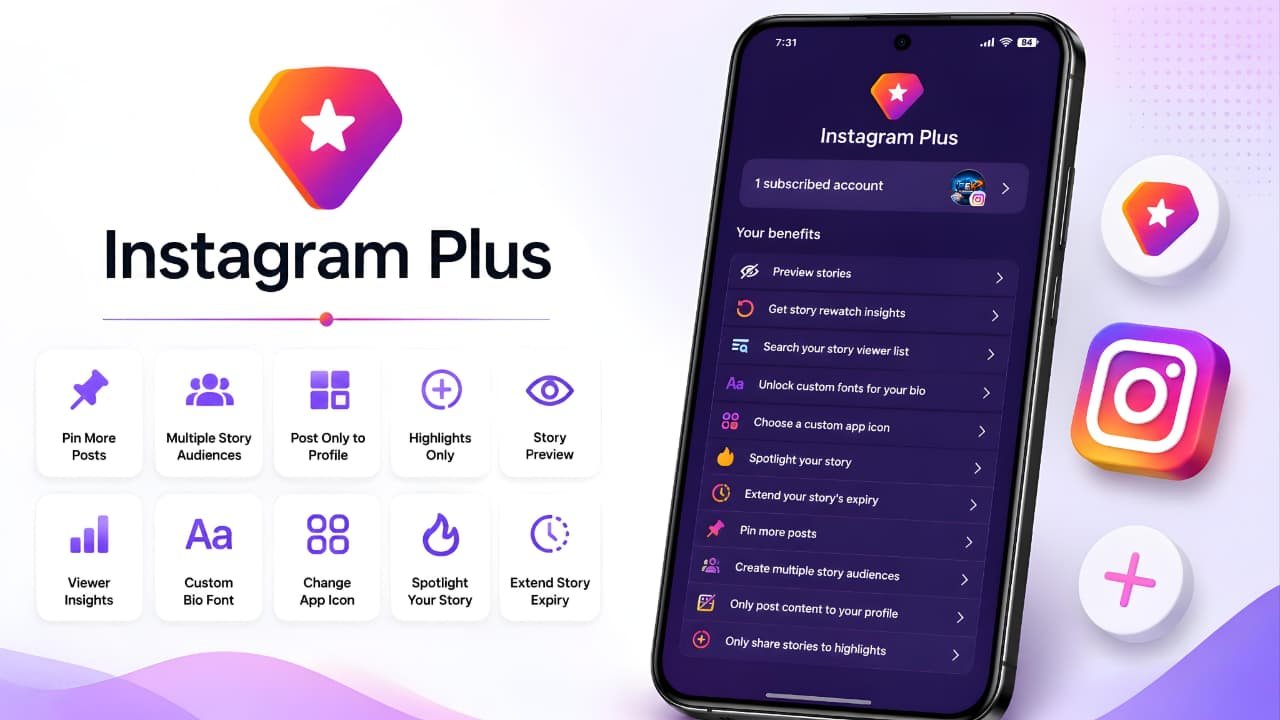
To continue improving the experience for users who want more advanced tools, Meta has introduced Instagram Plus, an optional premium subscription that provides additional features beyond the standard Instagram experience.
Since its introduction, Instagram Plus has generated significant interest and also considerable confusion. Some users believe Instagram is becoming a paid platform, while others assume that subscribing automatically increases followers, boosts Story reach, or improves the Instagram algorithm. These assumptions are incorrect.
According to Meta, Instagram Plus is an optional subscription that adds extra features for eligible users. The standard version of Instagram remains free and continues to offer all of the platform’s core features, including posting photos, uploading Stories, watching Reels, sending Direct Messages, creating Live videos, and interacting with other users.
In other words, Instagram Plus is designed as an upgrade—not as a replacement for the free Instagram experience.
This guide has been created.
Instagram Plus is an official subscription introduced by Meta. For the latest announcements and feature rollouts, you can visit the official Instagram Newsroom.
As Instagram continues to introduce new features and subscription benefits, keeping your account secure is just as important. Learning how to protect your Google Account can also help safeguard the email address connected to your Instagram profile.
What Is Instagram Plus?
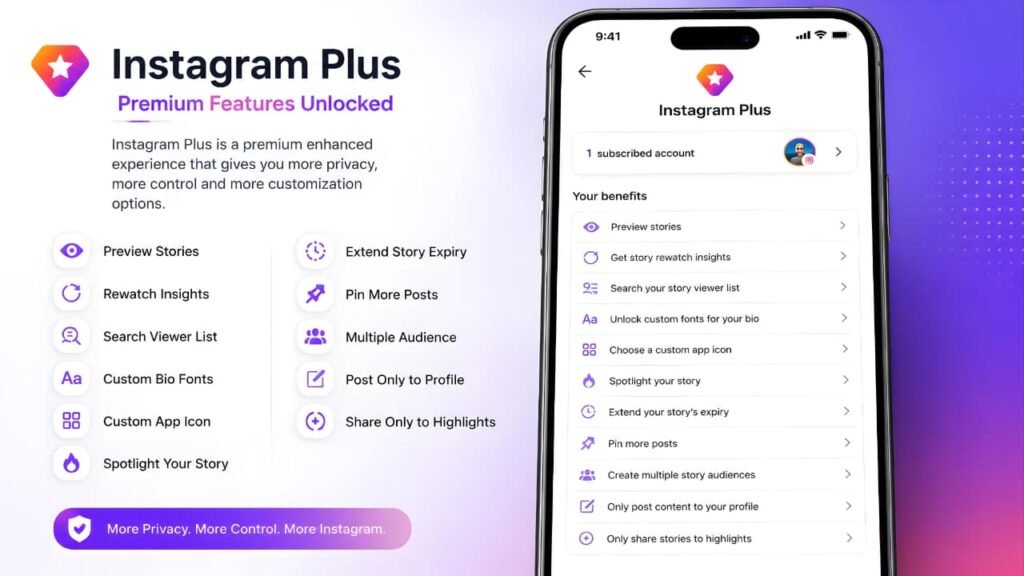
Instagram Plus is an optional premium subscription introduced by Meta that gives eligible Instagram users access to additional features designed to improve personalization, Story management, and profile customization.
One of the biggest misconceptions about Instagram Plus is that Instagram is becoming a paid platform. That is not true.
Instagram continues to offer its core experience completely free. You can still create an account, post photos and videos, upload Stories, watch Reels, send Direct Messages, go Live, follow other users, comment on posts, and use the Explore page without paying for a subscription.
Instagram Plus does not replace the free version of Instagram. Instead, it adds a collection of premium tools for users who want more flexibility and control over how they use the platform.
Think of Instagram Plus as an optional upgrade. If the standard version already meets your needs, you can continue using Instagram exactly as before. If you want access to additional personalization and Story-related features, you can choose to subscribe if the service is available for your account.
Unlike unofficial apps that use the name “Instagram Plus,” this subscription is an official Meta product integrated directly into the Instagram app. Users do not need to download a separate application or install third-party software. Everything is managed through Instagram’s official settings and subscription system.
If you’re also interested in Instagram’s privacy improvements beyond premium features, you can learn more about Instagram end-to-end encryption changes and how the platform continues to evolve.
Key Takeaways
- Instagram Plus is an official premium subscription from Meta.
- Instagram remains completely free without a subscription.
- No separate app needs to be downloaded.
- The subscription adds extra features instead of replacing existing ones.
- Availability depends on your country, platform, and account eligibility.
Why Did Meta Introduce Instagram Plus?
Instagram has changed significantly over the last few years.
Originally, the platform focused mainly on sharing photos with friends and family. Today, Instagram supports a much wider range of activities. People use it to run businesses, build personal brands, promote products, educate audiences, publish creative work, and communicate with customers.
As the platform expanded, many creators and businesses requested additional tools that could help them manage their content more effectively without changing the experience for everyone.
Instead of placing every advanced feature inside the free version of Instagram, Meta introduced Instagram Plus as an optional subscription.
This approach allows Meta to continue providing Instagram free of charge while offering additional features to users who want more advanced capabilities.
According to Meta, Instagram Plus focuses on improving areas such as:
- Story management
- Profile personalization
- Content organization
- Additional subscriber features
Rather than changing Instagram’s core experience, Instagram Plus builds on top of it by providing optional enhancements for eligible subscribers.
Who Should Consider Instagram Plus?
Instagram Plus is not designed exclusively for influencers or businesses.
Anyone who has access to the subscription can choose to subscribe.
However, the premium features are likely to provide the greatest value for users who actively create or manage content.
It may be particularly useful for:
- Content creators
- Influencers
- Business owners
- Small businesses
- Online sellers
- Social media managers
- Marketing professionals
- Public figures
- Photographers
- Personal brands
These users typically publish Stories frequently, organize profile content, and interact with large audiences, making additional Story and profile tools more valuable.
For casual users who primarily browse Reels, chat with friends, or occasionally upload photos, the standard version of Instagram will usually provide everything they need.
Is Instagram Plus Available Worldwide?
No.
Instagram Plus is currently being released gradually.
According to Meta, availability depends on several factors, including:
- Country or region
- Account eligibility
- Device platform
- Feature rollout
This means two people using Instagram may not see the same subscription options, even if they live in the same country.
Meta frequently introduces new features in stages. This gradual rollout allows the company to test new experiences, collect feedback, and improve features before expanding them to more users.
If Instagram Plus does not appear in your account today, it does not necessarily indicate a problem. It may simply mean that the subscription has not yet reached your account or region.
Since availability depends on account eligibility and regional rollout, it’s always best to check the Instagram Help Center for the latest official information.
How to Check Whether Instagram Plus Is Available
The easiest way to check is directly from the Instagram app.
Step 1
Open Instagram and go to your profile.
Step 2
Tap the menu icon in the top-right corner.
Step 3
Open Settings.
Step 4
If your account is eligible, you’ll see an Instagram Plus section or subscription page.
Step 5
Open the subscription page to review:
- Available features
- Current pricing
- Promotional offers (if available)
- Renewal information
- Payment methods
- Terms of the subscription
If the option is not visible, your account may not yet be eligible, or Instagram Plus may still be rolling out in your region.
If you can’t find Instagram Plus in your account, review the Meta Accounts Center Help to understand how account settings and connected accounts are managed.
Official Note
According to Meta, Instagram Plus availability, subscription pricing, supported regions, promotional offers, and feature availability may vary over time. Always check the Instagram app or Meta Help Center for the latest information available for your account.
What You'll Learn Next
Now that you understand what Instagram Plus is and who it is designed for, the next section explores everything you should know before subscribing, including:
- How Instagram Plus pricing works
- Promotional offers explained
- Monthly billing
- Auto-renewal
- Payment methods
- AutoPay
- Eligible accounts
- Subscription management
- Important things to know before subscribing
These topics will help you understand the subscription itself before exploring every Instagram Plus feature in detail.
Instagram Plus Pricing
One of the most common questions users have after discovering Instagram Plus is how much the subscription costs. Unlike a one-time purchase, Instagram Plus is offered as a recurring subscription, which means you pay periodically to continue accessing the premium features included with your plan.
However, there is one important detail that every subscriber should understand before purchasing.
Instagram Plus does not have a single worldwide price.
According to Meta, the subscription price may vary depending on several factors, including:
- Your country or region
- Your device platform (Android or iPhone)
- Promotional offers currently available
- Your account eligibility
- Local taxes and billing policies
Because of these factors, two users may see different prices even if they are using Instagram in the same country.
For this reason, always consider the price shown inside your own Instagram app as the official subscription price for your account.
How Instagram Plus Pricing Works
Instagram displays the subscription details before you confirm your purchase.
The subscription page normally includes:
- Current subscription price
- Billing frequency
- Promotional offer (if available)
- Renewal price
- Next billing date
- Terms and conditions
This allows users to review the subscription carefully before completing the payment.
Unlike unofficial websites that may list outdated prices, the pricing displayed inside Instagram is always the most reliable source because it is linked directly to your account.
Quick Summary
- Pricing may vary by country or region.
- Promotional offers may be available for eligible users.
- Your Instagram app always shows the latest price for your account.
- The subscription renews automatically unless cancelled.
Promotional Offers Explained
Meta may occasionally provide introductory offers for eligible users.
These promotions are designed to allow new subscribers to experience Instagram Plus at a discounted price for a limited period.
If your account qualifies for an introductory offer, Instagram clearly displays:
- The discounted price
- How long the promotion lasts
- The regular subscription price after the offer ends
- The renewal date
It is important to understand that promotional pricing is temporary.
Once the promotional period ends, the subscription automatically continues at the standard price unless you cancel it before the next renewal.
For example, some users may see a discounted monthly price during the introductory period. However, this promotional offer should not be considered the permanent subscription price because Meta may change or remove promotions at any time.
Always subscribe through the official Instagram app or trusted app stores, and learn how to identify fake websites to avoid phishing pages or fake subscription offers.
Monthly Billing
Instagram Plus works on a recurring subscription model.
This means your payment is processed automatically at the beginning of each billing cycle as long as your subscription remains active.
Unlike purchasing a physical product, you are paying for continued access to premium features.
If your subscription expires because the payment cannot be completed or because you cancel it, your Instagram account remains active.
You do not lose:
- Your followers
- Your photos
- Your Reels
- Your Stories
- Your Direct Messages
- Your profile information
Only the Instagram Plus features become unavailable after your subscription ends.
Auto Renewal
One of the most important things to understand before subscribing is automatic renewal.
When you subscribe through Google Play or the Apple App Store, the subscription is set to renew automatically using your selected payment method.
This means you do not need to manually purchase Instagram Plus every month.
Instead, the payment is processed automatically on your renewal date.
Automatic renewal continues until you cancel the subscription.
Because of this, users should always review the renewal information shown during checkout.
Renewal Reminders
Depending on your device and payment platform, you may receive reminders before certain subscription events.
For example, if you subscribed using a promotional offer, your app store may notify you before the promotional period ends and before the regular subscription price begins.
These reminders help users review their subscription before the next payment is processed.
However, reminder availability depends on your platform and regional policies.
Payment Methods
Instagram Plus uses your device’s official payment platform.
This provides a secure payment experience while allowing users to manage subscriptions in one place.
Depending on your country, available payment methods may include:
- Credit Cards
- Debit Cards
- UPI
- Google Pay
- Google Play Balance
- Apple Pay
- Other supported payment methods
The exact payment methods available depend on your device and your region.
Before adding a payment method for Instagram Plus, make sure your connected Google account is secured with Google Passkeys instead of passwords whenever possible.
AutoPay Explained
Some payment methods support AutoPay, allowing future subscription payments to be processed automatically without requiring manual approval every month.
When AutoPay is enabled, your payment provider charges the subscription fee on the renewal date.
This ensures uninterrupted access to Instagram Plus.
If you no longer want the subscription, remember that disabling AutoPay alone may not cancel the subscription.
You should cancel Instagram Plus through your app store subscription settings.
Before You Subscribe
Before purchasing Instagram Plus, consider the following points:
- Review the current subscription price displayed inside Instagram.
- Read the promotional offer carefully if one is available.
- Check when the introductory period ends.
- Understand that subscriptions renew automatically unless cancelled.
- Review the supported payment methods.
- Confirm that Instagram Plus is available for your account.
Taking a few minutes to review these details can help you avoid unexpected renewal charges later.
Before purchasing Instagram Plus, review Meta’s official subscription terms and support information to understand billing, cancellations, and eligibility.
If your Instagram account is connected to your primary Google account, enabling Google two-step verification adds another layer of protection against unauthorized access.
Official Note
According to Meta, subscription pricing, promotional offers, renewal terms, supported payment methods, and feature availability may vary depending on your country, account eligibility, platform, and rollout status. Always review the subscription page inside the Instagram app before completing your purchase.
Complete Instagram Plus Features
The biggest reason people subscribe to Instagram Plus is access to a collection of exclusive features that are not available in the standard Instagram experience.
Instead of redesigning Instagram completely, Meta has focused on improving the features people already use every day especially Stories, profile customization, and content management.
These tools are designed to give subscribers more flexibility, personalization, and control over how they share content and interact with their audience.
It is important to understand that Instagram Plus does not replace the standard Instagram app. The subscription simply unlocks additional capabilities while the core Instagram experience remains the same.
Let’s explore each feature in detail.
Preview Stories
Stories are one of Instagram’s most popular features, allowing users to share photos and videos that disappear after a limited time.
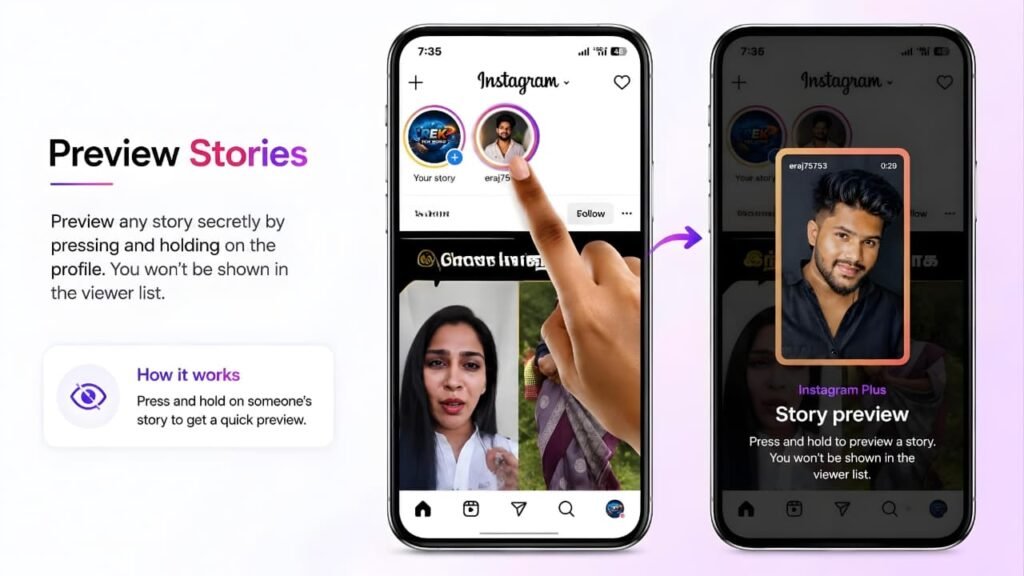
With Instagram Plus, eligible subscribers gain access to Preview Stories, a feature designed to make Story browsing more convenient.
Instead of immediately opening every Story one by one, Preview Stories gives subscribers a quick preview before deciding whether to watch the complete Story.
This is particularly useful for people who follow hundreds of accounts and receive a large number of Stories every day.
For example, imagine following creators, businesses, friends, and news pages. Rather than opening every Story individually, Preview Stories helps you quickly identify which Stories are most relevant to you.
Why Meta Introduced This Feature
Instagram Stories have become one of the most frequently used parts of the platform. As users follow more accounts, browsing every Story becomes increasingly time-consuming.
Preview Stories helps reduce unnecessary navigation by making Story browsing faster and more efficient.
Benefits
- Faster Story browsing
- Better organization
- Saves time
- Easier to decide which Stories to watch first
- Improved overall user experience
Things to Know
Preview Stories is designed as a convenience feature.
Meta does not describe it as a way to view Stories anonymously or bypass Instagram’s existing privacy system.
Story Rewatch Insights
Understanding how audiences interact with Stories can be just as important as knowing how many people viewed them.
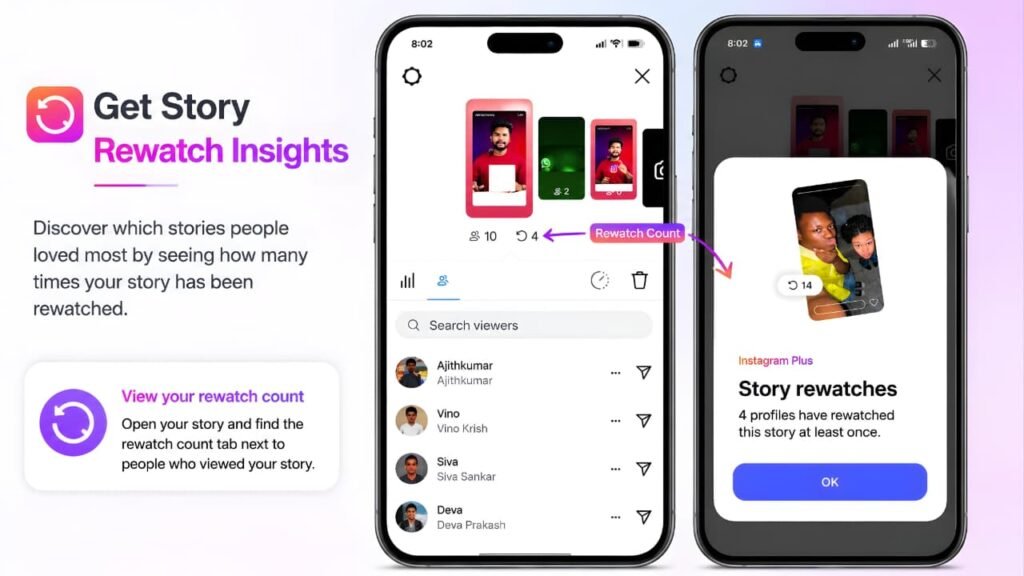
Instagram Plus introduces Story Rewatch Insights, providing subscribers with additional information about Story engagement.
Instead of showing only total Story views, this feature helps creators understand when viewers watch the same Story multiple times.
Repeated viewing often suggests that a Story captured attention or contained useful information.
For example, if a cooking tutorial receives many rewatches, it may indicate that viewers returned to follow the recipe again.
Similarly, if a product demonstration receives repeated views, it may suggest stronger customer interest.
Why This Matters
Traditional Story view counts only tell you how many people opened a Story.
Story Rewatch Insights provide another layer of information by helping creators understand which content encourages viewers to come back.
This allows creators to make better decisions when planning future content.
Best For
- Content creators
- Businesses
- Influencers
- Educators
- Marketing teams
Benefits
- Better audience understanding
- More meaningful Story analytics
- Improved content planning
- Easier performance evaluation
Search Story Viewer List
Managing Story viewers becomes increasingly difficult as an audience grows.
Accounts with thousands of Story views often spend significant time scrolling through viewer lists.
Instagram Plus simplifies this process with Search Story Viewer List.
Instead of manually searching through hundreds or thousands of names, subscribers can quickly search for a specific viewer.
This is especially valuable for creators and businesses that regularly interact with customers or community members.
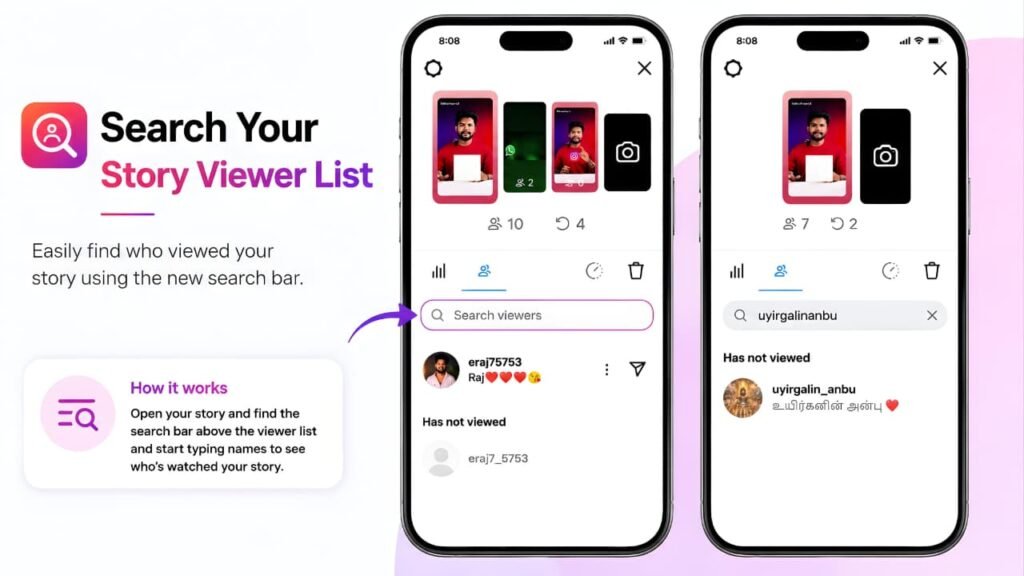
Practical Example
Imagine launching a new product and asking customers to watch your Story.
Instead of scrolling through thousands of viewers to confirm whether an important client viewed it, Search Story Viewer List allows you to locate that account almost instantly.
Benefits
- Saves time
- Easier viewer management
- Better customer interaction
- Faster audience verification
Custom Bio Fonts
An Instagram bio is often the first thing visitors notice when they open a profile.
Instagram Plus includes Custom Bio Fonts, allowing subscribers to personalize their profile using additional font styles provided within Instagram.
Previously, many users depended on third-party font generator websites.
Although these tools could produce decorative text, they sometimes created compatibility issues across different devices.
With Instagram Plus, profile customization becomes an official feature rather than requiring external tools.
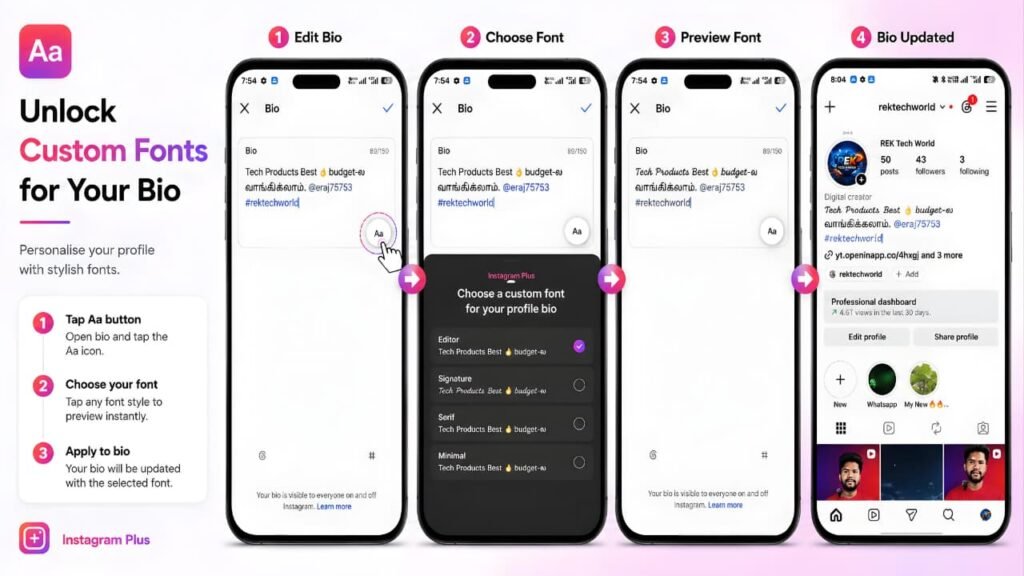
Why This Feature Is Useful
A distinctive bio can help profiles stand out while maintaining a consistent personal or business identity.
Creators can develop recognizable branding, while businesses can create a cleaner and more professional appearance.
Important Note
Custom fonts improve profile appearance, but Meta does not state that changing your bio font increases followers, engagement, or profile reach.
Custom App Icons
Instagram Plus also allows subscribers to personalize the appearance of the Instagram app on their device.
Instead of using the standard Instagram icon, users can choose from a collection of official app icons.
This feature is purely cosmetic and focuses on personalization.
It does not change Instagram’s functionality, improve performance, or unlock additional capabilities.
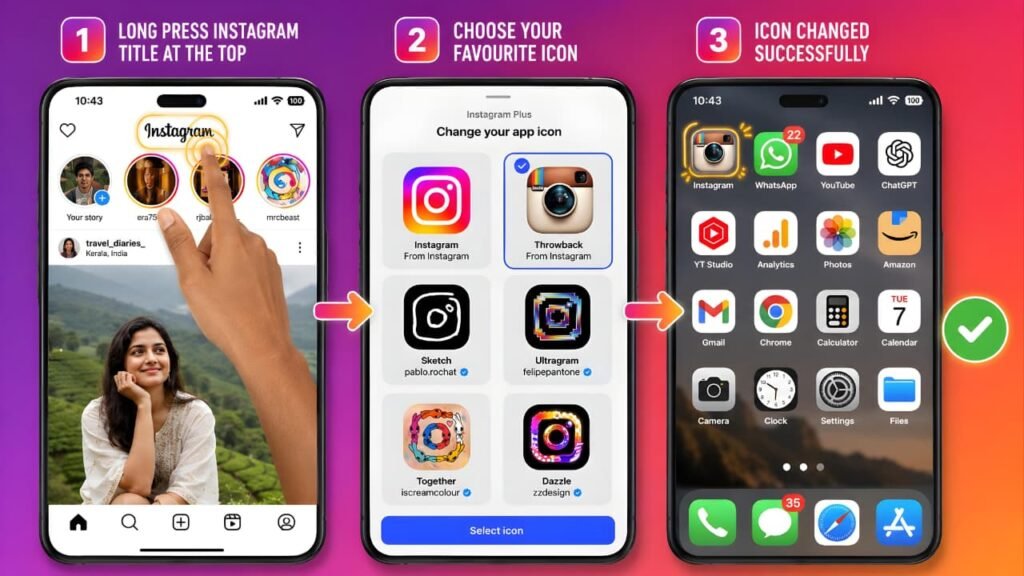
Benefits
- Customize your home screen
- Match your phone’s theme
- Use official Instagram icon designs
- No third-party launchers required
Quick Summary
- Preview Stories
- Story Rewatch Insights
- Search Story Viewer List
- Custom Bio Fonts
- Custom App Icons
These features focus on improving convenience, personalization, and content management rather than changing Instagram’s core experience.
Official Note
Instagram Plus features are introduced by Meta as optional subscriber benefits. Feature availability may vary depending on your country, account eligibility, device, and rollout status. Some features may become available gradually and not all subscribers will receive new features at the same time.
Story Spotlight
Among all the subscriber benefits included with Instagram Plus, Story Spotlight is one of the most noticeable features because it is designed to help an important Story stand out.
According to Meta, Story Spotlight gives selected Stories additional prominence, making them easier for friends to notice. Instead of treating every Story equally, subscribers can choose one Story that deserves extra attention.
However, understanding what Story Spotlight does—and does not do—is extremely important.
Many social media posts incorrectly claim that Spotlight guarantees more followers, increases Story views automatically, or forces Instagram’s algorithm to promote your content.
Meta does not make these claims.
Instead, Meta explains that Spotlight helps give an important Story additional visibility so it is easier for friends to find. The feature is intended to help users highlight important updates rather than artificially increase engagement.
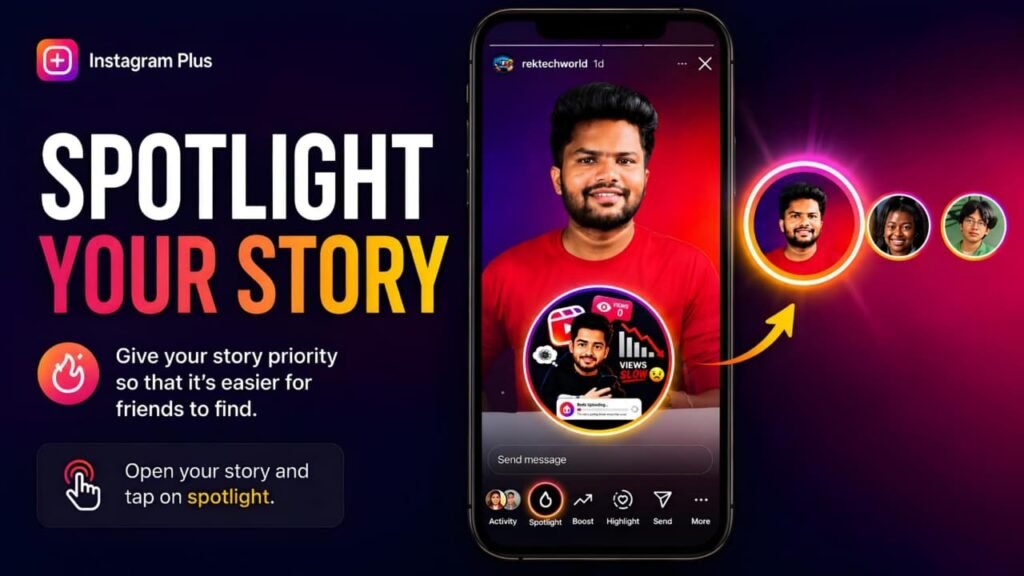
Why Did Meta Introduce Story Spotlight?
Stories have become one of Instagram’s primary communication tools.
People use Stories for:
- Product launches
- Business announcements
- Event reminders
- Travel updates
- Behind-the-scenes content
- Personal milestones
- Educational tips
- Limited-time offers
Because Stories disappear after a limited period, important updates can easily be missed by followers.
Story Spotlight addresses this problem by allowing subscribers to emphasize one important Story.
Rather than asking followers to search through multiple Story updates, Spotlight gives that Story additional attention within the Story experience.
How Story Spotlight Works
When the feature is available on your account, Instagram Plus allows you to choose an eligible Story and apply Spotlight.
Once Spotlight is enabled, Instagram identifies that Story as a highlighted Story.
According to Meta, this helps make the Story easier for friends to notice.
Meta does not explain the exact ranking signals or technical process behind Spotlight, and users should avoid assuming that it changes Instagram’s recommendation algorithm.
The company simply describes it as a way to give important Stories additional prominence.
When Should You Use Story Spotlight?
Because Story Spotlight has a usage limit, it should be reserved for updates that genuinely matter.
Examples include:
- Launching a new product
- Announcing an important business update
- Promoting a YouTube video or live stream
- Sharing registration deadlines
- Highlighting a limited-time discount
- Publishing important travel information
- Announcing an event
- Sharing emergency updates
Using Spotlight only for meaningful content helps maximize its value.
Why the Usage Limit Matters
According to the Instagram Plus subscription interface, Story Spotlight can only be used once every seven days.
This limitation encourages users to use the feature thoughtfully instead of applying it to every Story.
If Spotlight were available without restrictions, it would lose much of its purpose.
Instead, Meta positions it as a feature for highlighting your most important Story rather than your everyday updates.
What Story Spotlight Does Not Do
One of the biggest misconceptions surrounding Story Spotlight is that it guarantees higher performance.
Meta does not state that Story Spotlight:
- Guarantees more Story views
- Increases follower count
- Improves Instagram ranking
- Makes Stories go viral
- Improves Explore visibility
- Changes Instagram’s recommendation algorithm
Subscribers should think of Spotlight as a visibility tool—not a growth guarantee.
The quality and relevance of your content remain the most important factors influencing audience engagement.
Who Benefits Most?
Story Spotlight is likely to be most useful for:
- Small businesses
- Online stores
- Content creators
- Influencers
- Marketing teams
- Public figures
- Event organizers
- Educational creators
Users who frequently share announcements or time-sensitive information are likely to benefit the most.
Practical Example
Imagine that a small business is launching a weekend sale.
Normally, the announcement would appear alongside other Stories and disappear after its normal availability period.
By using Story Spotlight, the business can give that announcement additional prominence, making it easier for followers to notice before the promotion ends.
Likewise, a creator announcing a new YouTube upload could use Spotlight to help followers notice that important update.
Things You Should Know
Before using Story Spotlight, remember these important points:
- Spotlight is an optional Instagram Plus subscriber feature.
- Availability depends on your account and region.
- The feature has a usage limit.
- Meta describes it as giving additional prominence to important Stories.
- It should not be viewed as a replacement for creating high-quality content.
Quick Summary
Story Spotlight at a Glance
- Highlights an important Story.
- Designed to make the Story easier for friends to notice.
- Best suited for announcements and important updates.
- Can be used once every seven days (where available).
- Does not guarantee more followers or higher reach.
Official Note
Meta describes Story Spotlight as a subscriber feature that gives an important Story additional prominence so it is easier for friends to find. Meta does not state that Spotlight guarantees increased reach, higher engagement, or algorithmic promotion. Availability may vary by region, account eligibility, and rollout status.
Extend Story Expiry (48 Hours)
Stories are designed to share moments that disappear after a short period. In the standard Instagram experience, a Story is normally available for 24 hours before it expires automatically.
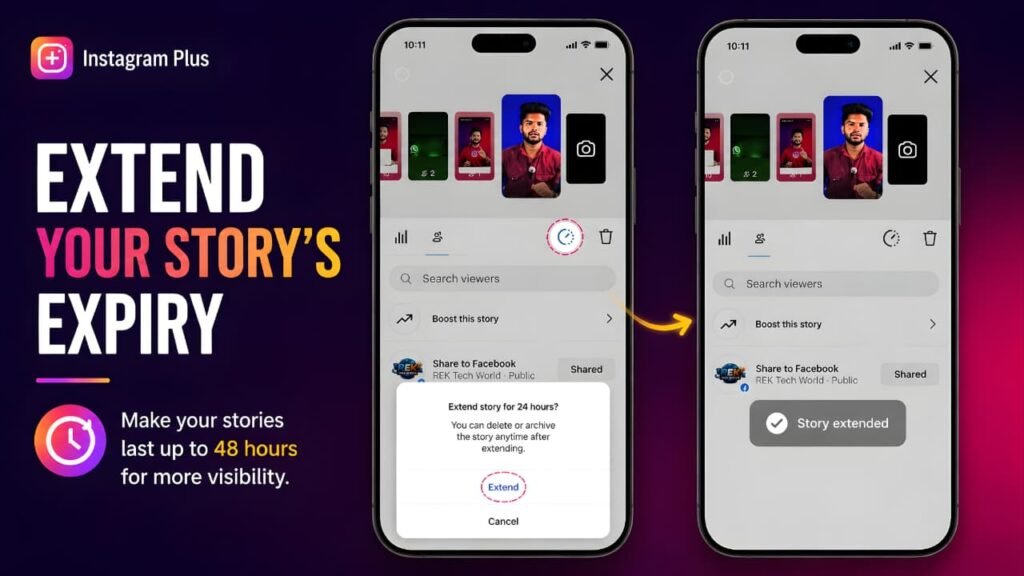
With Instagram Plus, eligible subscribers can choose to extend the availability of supported Stories for up to 48 hours.
According to Meta, this gives subscribers more flexibility when sharing important updates, allowing followers additional time to discover and interact with Story content.
For creators, businesses, and people with audiences across multiple time zones, this extra availability can be particularly useful because not every follower checks Instagram every day.
Why Did Meta Introduce This Feature?
Stories have become one of Instagram’s primary communication tools.
People use Stories for:
- Daily updates
- Product launches
- Event reminders
- Educational tips
- Travel updates
- Behind-the-scenes content
- Business announcements
Many of these updates remain relevant for longer than 24 hours.
By extending Story availability, Meta allows subscribers to keep important updates visible for an additional day without needing to repost the same content.
Practical Example
Imagine you announce a weekend workshop on Friday evening.
Some followers may not open Instagram until Saturday night.
With the standard Story duration, fewer people may see the announcement.
By extending the Story to 48 hours, subscribers give more followers an opportunity to view the update before it disappears.
Benefits
- More time for followers to view important Stories.
- Helpful for international audiences across different time zones.
- Reduces the need to repost the same Story.
- Better for promotions, announcements, and educational content.
Important Things to Know
Although Stories remain available longer, Meta does not state that extending Story duration automatically increases views or engagement.
The feature simply gives people more time to see your content.
High-quality content remains the most important factor in audience engagement.
Pin More Posts
Your Instagram profile often creates the first impression visitors have of your account.
Pinned posts allow important content to remain at the top of your profile, making it easier for visitors to discover key information immediately.
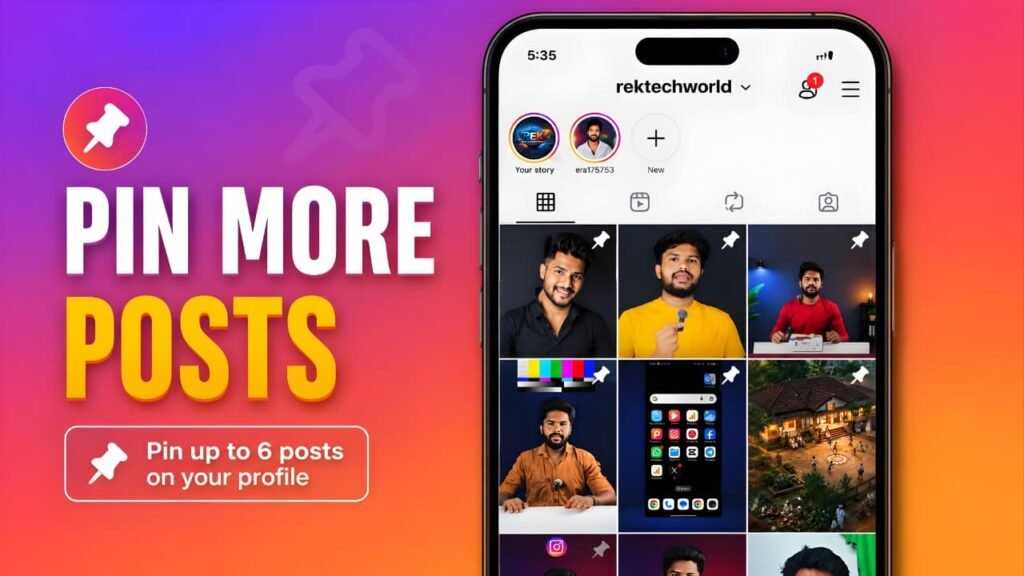
With Instagram Plus, eligible subscribers can pin up to six posts to the top of their profile.
This expands the standard pinning limit and gives users additional flexibility when organizing their profile.
Why Is This Feature Useful?
Every Instagram profile has content that deserves long-term visibility.
Examples include:
- Welcome posts
- Brand introductions
- Product collections
- Service information
- Portfolio work
- Frequently asked questions
Instead of allowing these posts to move lower as new content is published, pinned posts ensure they remain visible.
Increasing the number of pinned posts gives creators and businesses more opportunities to showcase their most valuable content.
Practical Example
A photographer may pin:
- Portfolio introduction
- Wedding photography
- Wildlife photography
- Portrait collection
- Client testimonials
- Booking information
When someone visits the profile for the first time, these important posts appear before newer uploads.
This creates a more organized and professional presentation.
Benefits
- Better profile organization.
- More important content stays visible.
- Helpful for businesses and creators.
- Improves first impressions for profile visitors.
Important Note
Pinned posts improve profile organization.
Meta does not state that pinning additional posts increases reach, improves ranking, or affects Instagram’s recommendation algorithm.
Multiple Story Audiences
Privacy and audience control are becoming increasingly important on social media.
Instagram already allows users to share Stories with Close Friends.
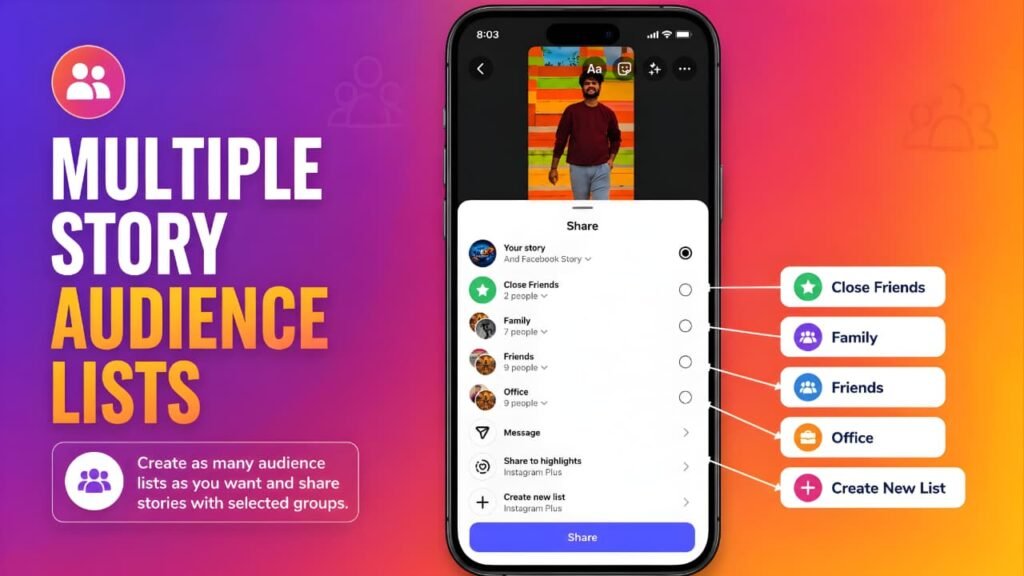
Instagram Plus expands audience management by allowing eligible subscribers to create multiple Story audience lists.
Instead of maintaining only one private audience, subscribers can organize different groups based on who should see specific Stories.
Why This Feature Matters
Not every Story is intended for every follower.
For example:
- Family updates
- Friends
- Work colleagues
- VIP customers
- Business clients
- Team members
Creating separate Story audiences makes sharing more flexible while helping users maintain better privacy.
Real-World Example
A business owner might create separate Story audiences for:
- Employees
- Customers
- Business partners
Instead of publishing the same Story to everyone, each audience receives content that is relevant to them.
Benefits
- Better privacy.
- More personalized Story sharing.
- Improved audience organization.
- Greater flexibility for creators and businesses.
Important Note
Multiple Story Audiences control who can view your Story.
Meta does not state that creating additional audience lists changes Story ranking or increases engagement.
Post Only to Profile
Sometimes users want content to appear on their profile without publishing it into followers’ main feeds.
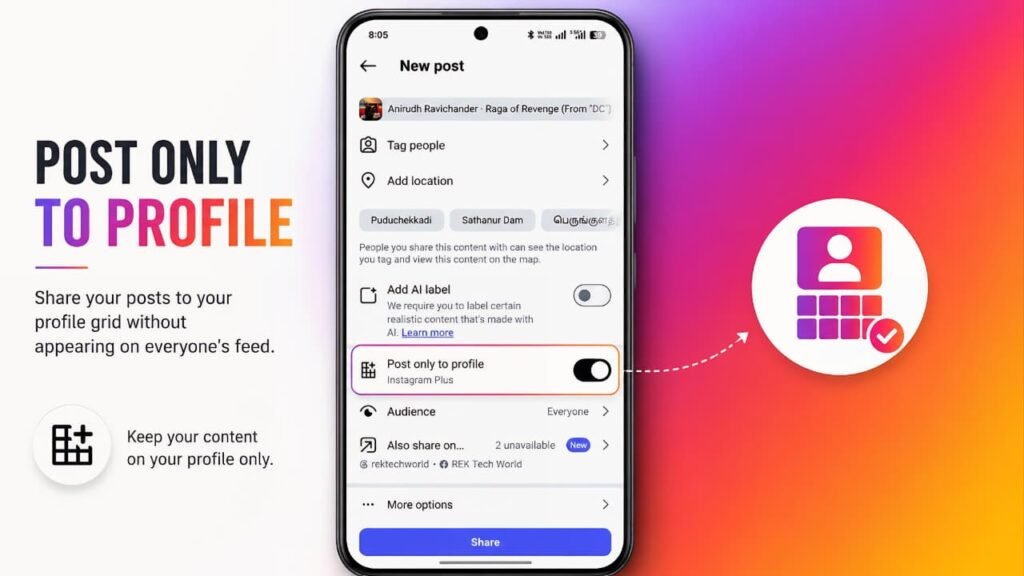
Instagram Plus introduces an option that allows eligible subscribers to post directly to their profile.
This helps users organize permanent profile content without treating every upload as a feed announcement.
Why Is This Helpful?
Not every post needs immediate attention.
Examples include:
- Portfolio updates
- Certificates
- Price lists
- Business information
- Reference material
Publishing directly to the profile allows these posts to become part of the profile without relying on feed distribution.
Benefits
- Cleaner profile organization.
- Better portfolio management.
- Useful for businesses.
- Helpful for long-term reference content.
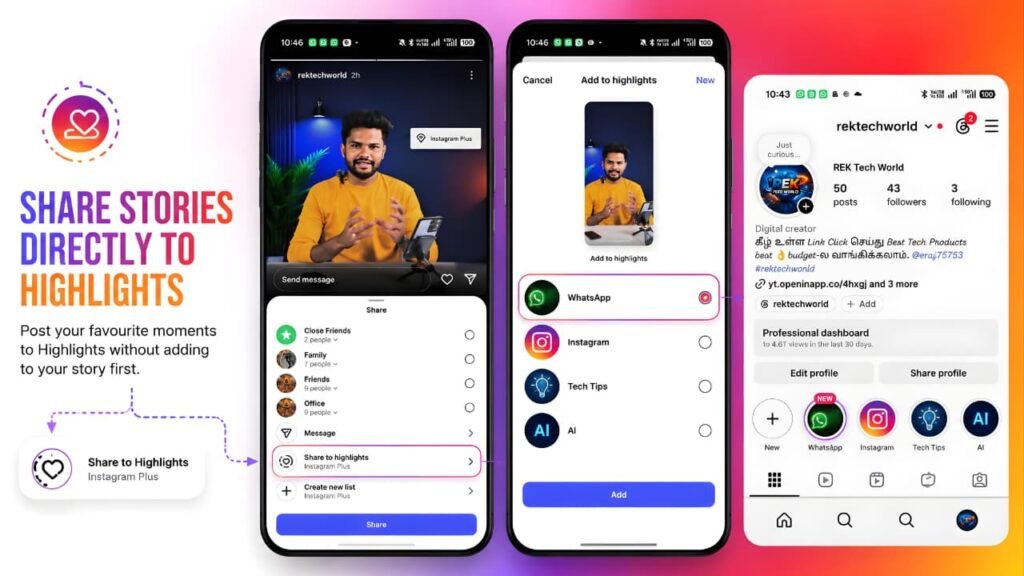
Share Stories Directly to Highlights
Highlights are designed to preserve important Stories beyond their normal availability period.
Instagram Plus makes this workflow easier by allowing eligible subscribers to add supported Stories directly to Highlights.
This simplifies profile organization while reducing unnecessary steps.
Why Creators Like This Feature
Highlights often contain:
- Product information
- Tutorials
- Travel collections
- Customer reviews
- Frequently asked questions
- Brand introductions
Being able to organize this content more efficiently saves time, especially for accounts that publish Stories regularly.
Benefits
- Faster Highlight management.
- Cleaner profile organization.
- Easier content archiving.
- Better experience for businesses and creators.
Subscribed Accounts & Eligible Accounts
One of the newest sections introduced with Instagram Plus is Subscribed Accounts.
This feature allows certain eligible Instagram accounts connected through the same Meta Accounts Center to receive some subscriber benefits without requiring a completely separate subscription.
The wording used by Meta is important.
Meta says “eligible accounts” and “some benefits.”
It does not state that every feature is automatically shared with every linked account.
What Is an Eligible Account?
Meta has not published a complete checklist explaining exactly how eligibility is determined.
However, according to the subscription interface, eligibility generally depends on factors such as:
- Accounts connected in the same Meta Accounts Center.
- Regional availability.
- Feature rollout.
- Platform support.
- Account eligibility determined by Meta.
Because rollout continues, two linked accounts may not receive identical benefits.
How Can You Check?
The easiest method is:
- Open Instagram.
- Go to Accounts Center.
- Open Instagram Plus.
- Review the Subscribed Accounts section.
If another linked account appears with sharing options, it is currently eligible for the available shared benefits.
If it does not appear, the feature may not yet be available for that account or region.
Important Note
Meta does not guarantee that every Instagram Plus feature is shared across linked accounts.
Only the subscriber benefits supported for eligible accounts are shared, and availability may change as Instagram Plus continues rolling out.
Feature Summary
| Feature | Main Benefit | Best For |
|---|---|---|
| 48-Hour Stories | Keep Stories available longer | Creators & Businesses |
| Pin up to 6 Posts | Showcase more important content | Professional Profiles |
| Multiple Story Audiences | Better audience control | Businesses & Teams |
| Post Only to Profile | Organize profile content | Portfolio Accounts |
| Stories to Highlights | Simplify Highlight management | Creators |
| Subscribed Accounts | Share some benefits with eligible linked accounts | Multi-account users |
Instagram Plus vs Free Instagram
One of the biggest questions people ask before subscribing is whether Instagram Plus actually changes the overall Instagram experience or simply adds a few extra features.
The answer is straightforward.
Instagram Plus is not a replacement for Instagram. Instead, it is an optional subscription that builds on top of the standard Instagram experience by adding additional subscriber-only tools.
If you never subscribe, Instagram continues to work exactly as it always has. You can still post photos, upload Stories, create Reels, send Direct Messages, watch videos, comment on posts, follow other accounts, and use every core feature without paying anything.
Instagram Plus simply unlocks additional customization, Story management, and content organization features for eligible subscribers.
This means users should not think of Instagram Plus as “a better Instagram.” Instead, it is more accurate to think of it as an optional enhancement for people who want additional flexibility.
Comparison
| Feature | Free Instagram | Instagram Plus |
|---|---|---|
| Photos & Videos | ✔ Available | ✔ Available |
| Reels | ✔ Available | ✔ Available |
| Stories | ✔ Available | ✔ Available |
| Direct Messages | ✔ Available | ✔ Available |
| Preview Stories | — | ✔ |
| Story Rewatch Insights | — | ✔ |
| Story Spotlight | — | ✔ |
| 48-Hour Stories | — | ✔ |
| Pin More Posts | Standard Limit | Up to 6 Posts |
| Multiple Story Audiences | Limited | ✔ |
| Post Only to Profile | — | ✔ |
| Share Stories to Highlights | Standard Workflow | Simplified Workflow |
Instagram Plus vs Meta Verified
Many users confuse Instagram Plus with Meta Verified because both are subscription services offered by Meta.
However, they are designed for completely different purposes.
Instagram Plus focuses on enhancing how you use Instagram.
Its subscriber benefits include Story management, profile customization, content organization, and other premium tools that improve the overall experience inside the Instagram app.
Meta Verified, by comparison, focuses on identity verification and account protection. Depending on availability, it may include benefits such as a verified badge, proactive account protection, access to account support, and identity verification.
Although both are subscriptions, one does not replace the other.
If your goal is to personalize your Instagram experience and access additional creator tools, Instagram Plus is the more relevant subscription.
If your goal is to verify your identity and receive account-related support, Meta Verified is the appropriate option.
Some users may choose one subscription, while others may decide to subscribe to both if they meet different needs.
Advantages of Instagram Plus
Instagram Plus introduces several practical improvements for people who use Instagram regularly.
Major Benefits
- Official subscriber features developed by Meta.
- Better Story management tools.
- Additional Story insights.
- Easier profile customization.
- More flexibility when organizing profile content.
- Better audience management.
- Improved Highlight organization.
- More personalization options.
- Helpful workflow improvements for creators.
- Useful tools for businesses and professional accounts.
Perhaps the biggest advantage is that these features are built directly into Instagram, eliminating the need for unofficial third-party customization apps.
Limitations of Instagram Plus
While Instagram Plus offers useful subscriber benefits, it is important to understand its limitations.
Things Instagram Plus Does Not Do
- It does not replace Instagram.
- It does not remove the need for quality content.
- It does not guarantee more followers.
- It does not guarantee higher engagement.
- It does not guarantee viral reach.
- It does not permanently lock pricing.
- It is not available to every account.
- Some features are still rolling out.
- Feature availability varies by country and account eligibility.
Understanding these limitations helps users make realistic expectations before subscribing.
Who Should Subscribe?
Instagram Plus may be worth considering if you:
- Create content regularly.
- Publish Stories frequently.
- Manage a business account.
- Sell products online.
- Use Instagram professionally.
- Need better audience organization.
- Want additional profile customization.
- Prefer official subscriber features over third-party tools.
Who Probably Doesn't Need Instagram Plus?
You may not need Instagram Plus if you mainly use Instagram to:
- Watch Reels.
- Browse the Explore page.
- Chat with friends.
- Occasionally upload photos.
- Follow your favorite creators.
The free version of Instagram already provides an excellent experience for these activities.
Frequently Asked Questions
Is Instagram Plus mandatory?
No. Instagram Plus is completely optional.
Can I continue using Instagram without subscribing?
Yes. The standard Instagram experience remains free.
Does Instagram Plus increase followers?
No. Meta does not state that Instagram Plus automatically increases followers.
Does Instagram Plus improve the Instagram algorithm?
No. Meta does not claim that subscribing changes Instagram’s recommendation algorithm.
Can I cancel anytime?
Yes. Subscribers can manage or cancel their subscription through the platform used to purchase it.
Will I lose my followers if I cancel?
No.
Cancelling Instagram Plus only removes subscriber features.
Your Instagram account, followers, posts, messages, and profile remain unchanged.
Can I subscribe again later?
Yes.
If Instagram Plus is available for your account, you can subscribe again whenever you choose.
Final Verdict
Instagram Plus is best viewed as an optional upgrade rather than a necessity.
It introduces a collection of subscriber-only tools that improve Story management, profile customization, audience organization, and content presentation without changing Instagram’s core experience.
For creators, businesses, educators, and professionals who rely on Instagram every day, these additional features may improve workflow and make account management more convenient.
For casual users, however, the free version of Instagram continues to provide everything needed for everyday social networking.
Before subscribing, review the features available for your account, compare them with your needs, understand the billing terms, and remember that pricing, eligibility, and feature availability may vary by region.
If the subscriber benefits align with the way you use Instagram, Instagram Plus may be a worthwhile addition. If not, you can continue enjoying Instagram without paying anything.
If Instagram Plus features don’t appear correctly or you experience technical issues while using Instagram, you can also read our guide on fixing common Instagram problems before contacting support.